

October 21, 2026
Magazine printing takes the production time confirmed for your specific order, plus any file corrections, proof approval, and delivery time outside that production window. For a 2026 issue, get both the production start condition and the expected arrival date in writing before you commit to a publication deadline.
The useful answer is an approved-file-to-arrival schedule for your exact magazine. A printing estimate alone does not tell you when copies will reach your office, event venue, or readers.
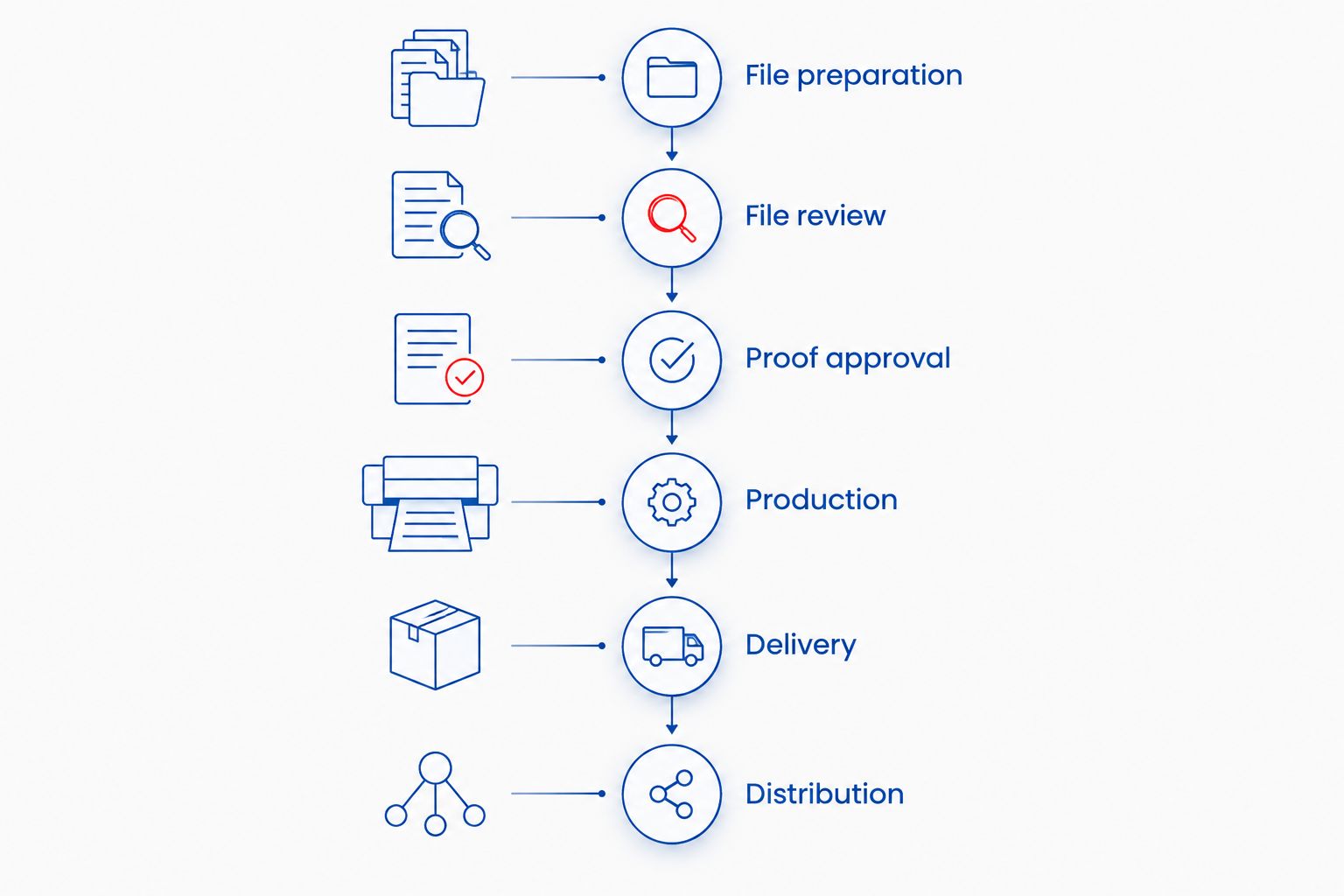
Use these steps to establish the deadline rather than assigning an unsupported number of days:
When discussing a magazine printing order with Publishing Xpress, provide those details together. A deadline without specifications is not enough to establish a dependable production schedule.
Your magazine has several deadlines, even when your calendar shows only a publication date. Editorial approval, print approval, dispatch, and arrival each mark a different point in the process.
For your 2026 production calendar, distinguish between copies arriving at your organization and copies reaching individual readers. If your team will label, package, or distribute magazines after delivery, include that work after the printer's delivery milestone.
Plan backward from the moment someone needs the magazine. A shipment arriving at your office does not finish the project when volunteers still need to prepare it for distribution.
Treat the schedule as a sequence of responsibilities. This makes it easier to see whether the next action belongs to your editor, designer, approver, printer, or delivery provider.
| Stage | What needs to happen | What you should confirm |
|---|---|---|
| File preparation | Complete the layout and prepare the print files | Required file format, size, bleed, and cover setup |
| File review | Resolve technical questions about the submitted files | Who handles corrections and how revised files are submitted |
| Proof approval | Review and approve the version intended for printing | Which approval releases the job to production |
| Production | Print, finish, and bind the magazine | The production period for the agreed specifications |
| Delivery | Move finished copies to the destination | Dispatch date, delivery estimate, and receiving details |
| Distribution | Get copies from your organization to readers | Who handles mailing, event setup, or local handout |
A production commitment applies to a defined job. Keep the specifications attached to the schedule so an editorial change does not quietly become a manufacturing change.
Do not assume uploading a file starts production. Ask whether the quoted period starts after file acceptance, proof approval, or another stated order requirement.
Record the answer beside your deadline. If the schedule depends on an approval, give that approval an owner and a due date rather than leaving it as an unassigned task.
A completion date needs a label. Ask whether it means production finished, shipment dispatched, or copies delivered to the stated address.
For a 2026 event issue, give the printer your required arrival date and the actual receiving location. An office delivery and an event-site delivery involve different receiving instructions, even when the magazines are identical.
Your magazine's specifications define the work the printer needs to schedule. Share the following details before asking for a firm completion date:
These are questions to settle, not reasons to assume a fixed delay. Get the schedule confirmed for the job you will actually submit.
Choose the binding for the magazine's construction and reader experience, then confirm its production schedule. Neither binding name, by itself, establishes an arrival date.
| Binding | Best for | Practical advantage | Limitation | Scheduling question |
|---|---|---|---|---|
| Saddle stitch | Slim magazines and booklet-style issues | Folded sheets fastened through the fold create a simple booklet | Page count follows folded-sheet construction; suitability depends on thickness | Does the final page count and paper combination fit this binding? |
| Perfect binding | Magazines intended to have a squared spine | Pages attach to an adhesive-bound cover with a distinct spine | Cover preparation depends on the final book-block thickness | When must the final page count and cover file be approved? |
Saddle-stitch construction works in 4-page increments because a folded sheet contributes four printed pages. An 8-page booklet uses two folded sheets, while a 12-page booklet uses three, before considering any separately specified cover arrangement.
Check how your printer counts the cover before finalizing the layout. Do not add blank pages merely to satisfy a count you have interpreted differently from the printer.
Perfect binding requires a cover prepared for the finished spine. Changing the interior page count or paper after preparing that cover creates a reason to check the cover dimensions again.
Keep the binding decision tied to the final specifications, not an assumed speed advantage. Ask the printer to compare schedules if either construction would suit your issue.
Finish the editorial decisions before treating the file as print-ready. A technically acceptable PDF can still contain the wrong advertisement, an outdated contents page, or a photograph that should have been replaced.
For your 2026 issue, make the final review a named task rather than a quick glance before upload.
Confirm articles, captions, contributor names, advertisements, and contact details before the final export. Check that the contents page matches the finished page order.
Assign a final decision-maker. Collect comments into a single correction list so the designer does not have to interpret competing instructions from separate messages.
Verify the finished page size, margins, bleed, and binding requirements against the printer's instructions. Keep essential text and page numbers away from trim edges and the binding area.
Review photographs at their intended printed size. Enlarging an image in the layout does not add image detail, so inspect the actual result rather than relying on how a thumbnail looks.
Open the exact PDF you intend to submit, not just the design document. Check for missing images, changed line breaks, unexpected blank pages, and incorrect page order.
Inspect the cover and interior as a complete publication. A corrected article can change pagination, which makes the contents page and any cross-references worth checking again.
Use a clear filename and keep the approval message attached to that file version. Tell the printer explicitly when a replacement file supersedes an earlier upload.
Never leave two files with ambiguous approval status. Clear version control gives everyone the same answer to the most important question: which magazine is authorized for printing?
Ask the printer whether the required arrival date is achievable with your completed specifications and files. Treat a faster schedule as something to confirm, not something the word urgent establishes.
Start with the deadline, destination, quantity, binding, and current file status. Explain whether the layout is finished and whether an authorized person can review the proof when it arrives.
If the original schedule does not fit, ask which changes would produce a different confirmed schedule. Do not remove essential proof checks or change binding on the assumption that either action guarantees a faster result.
Keep delivery in the conversation. A shorter production period does not answer whether the shipment will reach the destination in time.
Shipping belongs in your total project schedule, but you should ask whether it is included in the printer's stated turnaround. Keep production completion and expected arrival as separate calendar entries.
For a 2026 conference, fundraiser, or publication launch, confirm who can receive the shipment and where it should go. Include any venue receiving instructions before dispatch rather than trying to redirect copies afterward.
If your organization will mail individual copies, schedule that work after bulk delivery. Ask separately about any mailing service you need; do not assume magazine printing includes reader distribution.
Use the order conversation to remove ambiguity. You need agreement on the magazine, the approved files, the start condition, and the destination—not just a general promise to meet your deadline.
Confirm these points in writing:
Publishing Xpress is a fit for self-publishers and organizations seeking short-run magazine printing. Its service fit does not replace a job-specific deadline confirmation; approve the schedule alongside the specifications.
Plan your magazine printing order
Prepare your specifications, finished files, destination, and required arrival date before discussing the schedule.
How long does magazine printing take from PDF submission?
Magazine printing time depends on the confirmed schedule and the condition that starts production. Ask whether submitting the PDF is sufficient or whether file acceptance and proof approval must happen first.
Does magazine printing turnaround include shipping?
Confirm whether shipping is included in the stated turnaround. Production completion, dispatch, and arrival are different milestones, so request each relevant date.
Can I change my magazine after approving the proof?
Ask the printer before submitting any post-approval change. Establish whether production has begun and obtain confirmation of how the change affects the files and schedule.
Is saddle-stitch magazine printing faster than perfect binding?
Do not assume saddle stitch is faster for your order. Ask for schedules based on the same quantity, paper, finished size, and delivery destination before comparing the bindings.
How do I plan magazine printing for a 2026 event?
Plan magazine printing backward from the date finished copies must arrive. Include file review, proof approval, production, delivery, and any distribution your team handles afterward.
What should I send when asking Publishing Xpress about magazine printing?
Send Publishing Xpress your quantity, finished size, page count, paper preferences, color requirements, binding, destination, and required arrival date. Explain whether the print files are complete so the scheduling discussion starts from the correct stage.
Should I skip proof review if my magazine deadline is close?
Keep a final proof review in your schedule. Check the exact production file for page order, advertisements, photographs, captions, and cover details before authorizing printing.
Put the arrival deadline above the upload deadline on your production checklist. Uploading files is an action your team completes; receiving usable magazines is the outcome your event or publication needs.
Before approval, read the schedule back as a complete sequence: approved file, production start, dispatch, arrival, and distribution. If anyone interprets a milestone differently, resolve it before the magazine enters production.
© 2026 Publishing Xpress. All Rights Reserved.

