

October 22, 2026
Yes, you can print a hardcover book with a dust jacket through a printer that handles that construction. The jacket is a separate printed component, so you need a jacket-specific template and confirmation that your order includes printing, folding, and fitting it to the finished book. For your 2026 project, settle the binding and interior paper before finalizing the jacket artwork.
A cover design is not automatically a production-ready cover file. The artwork must match the physical construction of the book, including its spine, folds, and any flaps.
Choose the construction before you pay for final artwork. Start with the practical differences in book binding types, then ask your selected printer for the correct specifications. That order keeps you from designing around dimensions that change later.
Yes. The important distinction is between the book’s attached cover and the removable paper jacket wrapped around it. A jacket is not the binding, and adding one does not change how the pages are held together.
For a 2026 print order, use this sequence to establish what the printer will produce:
Do not treat a product photograph as an order specification. A pictured jacket does not establish what your particular order includes, which files you must supply, or how the finished books will be packed.
Ask the printer to list the required files, identify the jacket’s fold positions, and explain the proofing process. Request written confirmation of the finished dimensions and the point after which changes require new artwork.
Keep that specification with your design brief. Your designer needs the production template, not just a reference image of a book you like.
A removable jacket and a printed paperback cover solve different presentation needs. Neither makes the writing, editing, or interior layout better by itself.
Choose based on what your reader will do with the book. A novel read from beginning to end has different handling needs from a workbook used beside a keyboard or a cookbook opened during meal preparation.
| Presentation | Best for | Main advantage | Main limitation |
|---|---|---|---|
| Removable dust jacket | Editions where a separate wrap and flap copy are part of the concept | Provides an outer design surface that readers can remove | Requires a separate layout and fit check; the jacket can crease or tear |
| Perfect bound paperback | Novels, memoirs, poetry collections, and other reading-focused books | Keeps the cover attached to the book without a loose wrap | Does not provide a removable jacket or its interior flaps |
Choose a jacket because the separate wrap serves your edition—not because you assume every printed book needs one. If your main goal is a finished paperback readers can carry and read, perfect binding deserves consideration before you commission jacket artwork.
A typical jacket layout includes a back flap, back panel, spine, front panel, and front flap. The panels and folds must line up with the finished book, not simply with the dimensions of the interior pages.
Place the file according to the printer’s template. Do not rearrange panels based on an online example: the supplied template determines orientation and production boundaries.
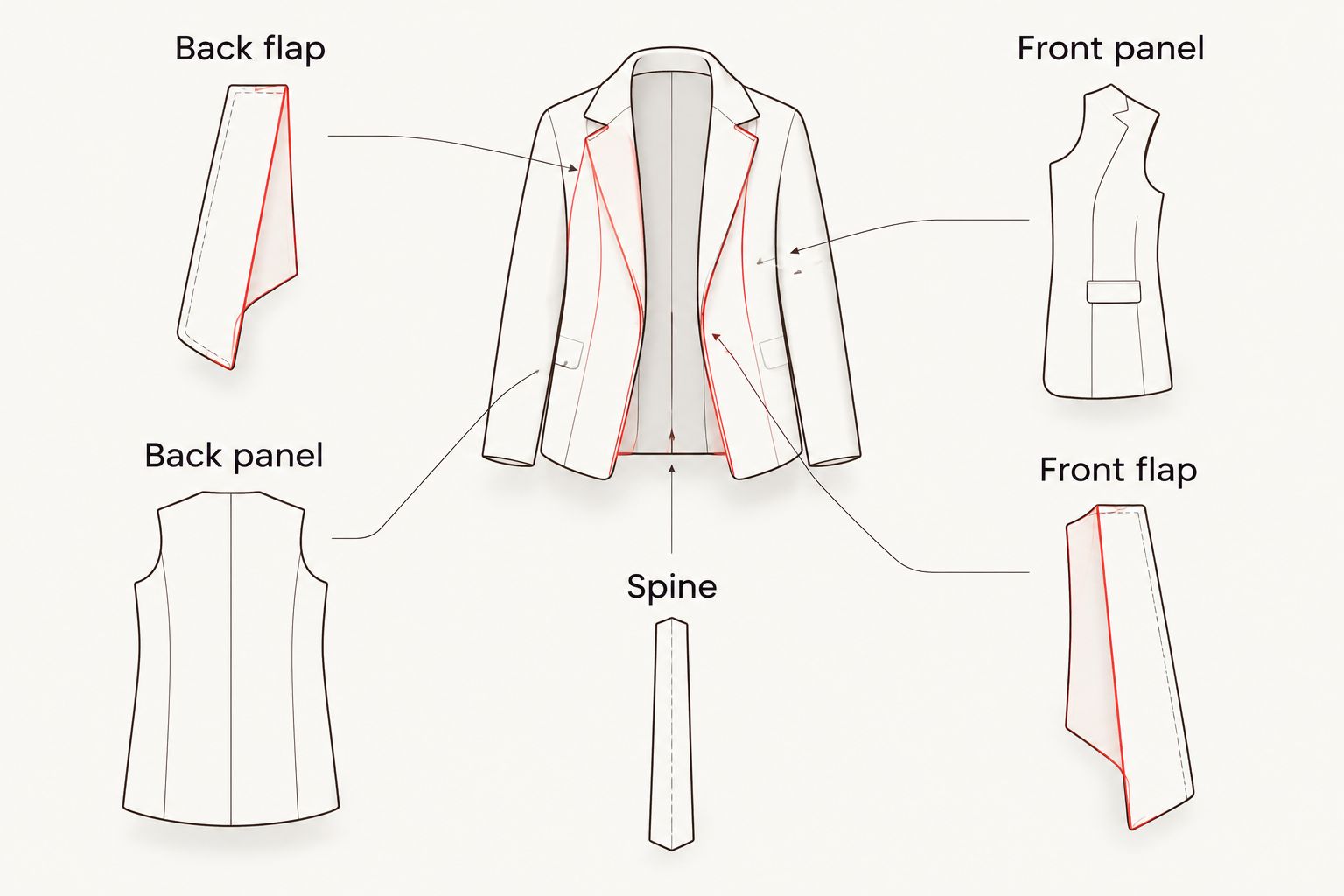
Give every panel a clear job. Repeating the same description on the back panel and front flap wastes space that could explain the book’s subject, intended reader, or author background.
A fold is a physical transition, not just a guide on your screen. Keep essential text, faces, and small details within the safe areas specified by the printer.
Background artwork can continue across panels when the template permits it. Important content still needs room to remain readable after folding and fitting.
There is no universal jacket file that fits every book. For a 2026 project, the selected printer’s production specifications take precedence over dimensions copied from a previous edition.
These factors determine what your designer needs:
Do not calculate a final jacket from page count alone. Ask the printer to confirm the finished specification after the interior choices are settled.
Treat jacket preparation as a separate task from editing the manuscript. Keep the text stable before you commission the final layout, because changes that add or remove pages affect more than the table of contents.
Finish the front matter, main text, illustrations, and back matter. Include intentional blank pages in the final file so the printer and designer work from the same page count.
Check that the PDF page dimensions match the intended trim size. A document that looks correct in a word processor still needs a final exported-file review.
Use the printer’s template at its intended size. Keep fold guides and production instructions separate from the artwork according to the printer’s submission requirements.
Avoid stretching a paperback cover to fill a jacket layout. The extra flap areas need deliberate design, and the outside dimensions follow a different construction.
Inspect the title, spine text, biography, and description at the size readers will see them. Zooming in hides problems with small type and crowded spacing.
Read every panel separately, then review the complete layout. Check names, punctuation, image permissions, and consistency between the jacket and title page.
Open the final PDF rather than relying on the design application’s preview. Verify page dimensions, font appearance, image placement, and any export settings required by the printer.
Send the exact version you approved. A clearly named final file reduces confusion when earlier drafts remain in the same project folder.
A digital proof helps you review the submitted artwork, but it does not let you handle the finished jacket. Ask which proof options let you assess the construction and fit before approving the full run.
For your 2026 proof review, separate content checks from physical checks:
Record corrections in a single revision list. After the printer updates the proof, check the corrected areas and the surrounding layout before approving it again.
A paperback removes the need to manage a loose jacket while keeping the cover design attached to the book. Perfect binding works for reading-focused projects; plastic coil and Wire-O deserve attention when readers need to keep pages open while working.
Publishing Xpress is best for self-publishers seeking short-run digital book printing in quantities of 25 copies or more. Publishing Xpress offers perfect bound printing alongside saddle stitch, plastic coil, and Wire-O binding, with black-and-white or color printing.
For a shorter booklet, Publishing Xpress limits saddle stitch printing to 80 pages. That is a booklet specification, not a reason to force a longer manuscript into a format that does not fit.
The trade-off is functional: perfect bound books do not stay open hands-free as readily as coil- or wire-bound formats. Decide whether your project is primarily for reading, writing, or repeated reference before choosing its binding.
For your 2026 schedule, Publishing Xpress ships in 4 to 6 days after proof approval. Plan delivery separately, and allow time before approval for file preparation and corrections.
Yes, you can reuse suitable images, typography, and copy from your paperback design. You still need a new layout built to the jacket template, including the flaps and revised panel positions.
Keep editable source files rather than relying only on a flattened cover image. That gives your designer room to reposition elements without treating the entire cover as a single picture.
Finish the interior layout before approving final jacket dimensions. You can develop the visual concept earlier, but final paper and page-count decisions affect the book’s thickness and jacket fit.
Ask your designer to separate concept approval from production-file approval. That lets you settle the look without pretending the manufacturing dimensions are already fixed.
No, a dust jacket sits around the book’s attached cover. Removing the jacket leaves the book intact.
Decide what information readers should still see when the jacket is removed. Then confirm the design requirements for the underlying cover with the printer handling that edition.
Can you print a hardcover book with a dust jacket?
Yes, a printer that handles that construction can produce a book with a separate removable dust jacket. Confirm that jacket printing, folding, and fitting are included in your specific order.
Is a dust jacket the same as a book cover?
No, a dust jacket is a removable wrap around the attached book cover. It does not bind the pages together.
Can I send a paperback cover PDF as my jacket file?
Not unchanged. A jacket needs a layout that includes its flaps and follows the selected printer’s finished-book dimensions and fold positions.
What determines the width of a book jacket?
The finished book dimensions, spine area, flap dimensions, and printer’s production allowances determine the jacket layout. Request the final template after choosing the interior paper and page count.
Should I approve a dust jacket from a screen preview alone?
A screen preview does not establish physical fit. Ask the printer which proof option lets you inspect the jacket around the finished book before approving production.
What is the minimum quantity for Publishing Xpress book printing?
Publishing Xpress has a minimum print quantity of 25 copies. Choose the binding according to the project’s page count and how readers will use it.
What is the maximum page count for Publishing Xpress saddle stitch books?
Publishing Xpress offers saddle stitch books up to 80 pages. For a longer project, review another binding rather than assuming saddle stitch will accommodate it.
When does Publishing Xpress ship after proof approval?
Publishing Xpress ships in 4 to 6 days after proof approval. Keep transit time separate when planning when your books need to arrive.
Review the book without its jacket, too. A reader can remove a jacket immediately, so the underlying book still needs to make sense as a complete object.
Before approving your 2026 edition, check both presentations: jacket on and jacket off. That simple review catches a design decision that a flat artwork preview cannot show.
© 2026 Publishing Xpress. All Rights Reserved.

