

October 22, 2026
Yes—you can print a coffee table book in a short run of 25 copies in 2026, using digital printing for a photo-led paperback or bound portfolio. The main caveat is that binding, paper, and image preparation still need to suit your design; a smaller order does not remove those requirements.
Yes. Short-run digital printing lets you produce a small batch of an image-led book rather than commit to a large inventory. Your next decision is how readers will handle the finished book: browse it, display it, or leave it open beside them.
Publishing Xpress short-run book printing is best for self-publishers and organizations ready to order at least 25 copies. That minimum makes it a batch-printing option, not a service for ordering a single finished copy.
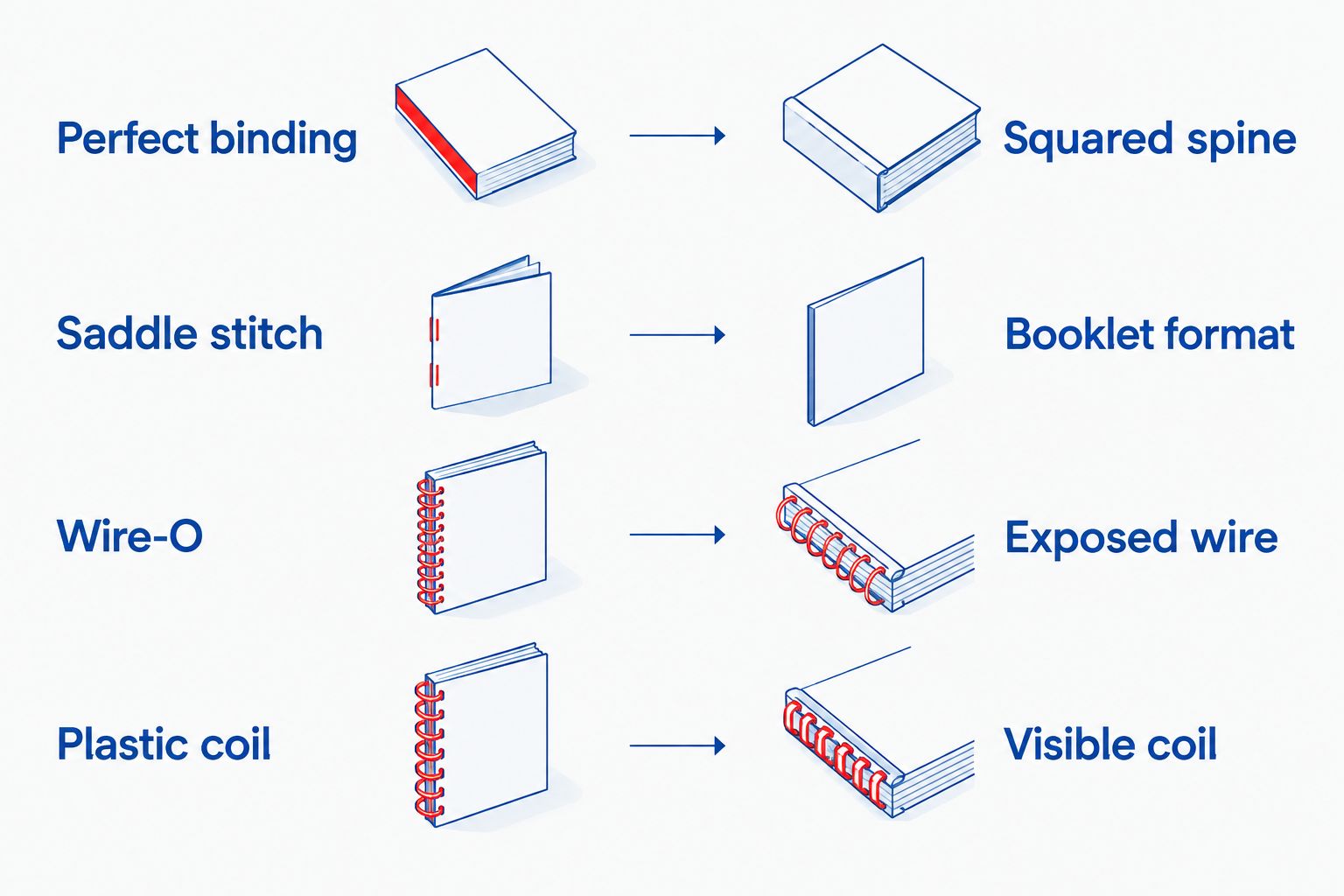
| Binding | Best for | Main advantage | Main limitation |
|---|---|---|---|
| Perfect binding | Paperback photography and art books | A glued, squared spine creates a conventional book format | Does not lie completely flat; images need room at the gutter |
| Saddle stitch | Short visual collections and compact photo essays | Folded pages create a simple booklet format | Maximum of 80 pages; no squared spine |
| Wire-O | Display portfolios and frequently viewed image collections | Pages lie flat for hands-free viewing | Exposed wire changes the appearance of the binding edge |
| Plastic coil | Working portfolios and image-led reference books | Pages turn around the coil and lie flat | Visible coil gives the book a functional appearance |
A coffee table book succeeds through its photographs, sequencing, and physical presentation—not the size of its print run. A smaller batch lets you match the order to a defined audience, such as exhibition visitors, family members, clients, or supporters.
The trade-off is responsibility for the whole batch. You need somewhere to keep the books and a plan for distributing them, even when the order is small. Choose the quantity from your intended readership, not from an assumption that more copies will automatically find buyers.
For a 2026 project, settle the format before you finish the page layouts. Changing the binding late can mean moving captions, adjusting margins, and rebuilding the cover.
Choose perfect binding when you want a conventional paperback coffee table book with a squared spine. It suits photography collections, illustrated histories, art books, and other projects readers browse as a complete publication.
The limitation is the center gutter, where facing pages meet. Perfect-bound pages do not lie completely flat, so a photograph stretched across a spread needs careful placement. Keep faces, lettering, and other essential details away from the center.
Do not assume that every thin photo collection can use perfect binding. Ask the printer to confirm whether your page count and selected paper create a suitable spine before you build the cover file. Spine width depends on the finished book, not just the cover designer's preference.
Choose saddle stitch for a shorter photo essay or compact art collection rather than a thick volume. Publishing Xpress limits saddle stitch books to 80 pages, so confirm your complete page count before choosing this format.
Saddle stitching uses folded sheets secured through the fold. That construction suits a booklet-style publication, but it does not create a squared spine for a title.
Count more than the photographs. Your title page, introduction, captions, credits, and intentional blank pages all affect the layout. Ask how the printer counts the cover and interior pages, and confirm the required page arrangement before exporting your final PDF.
Choose Wire-O when staying open matters more than having a conventional book spine. The binding lets pages lie flat, which suits portfolios that readers examine closely or leave open on a table.
Its visible wire is also its main aesthetic trade-off. Decide whether that exposed binding supports the character of your collection before committing to the format.
Leave clear space along the punched edge. A flat-opening book still needs binding clearance, and neither captions nor important image details belong where the holes will go. Design each page to work within that usable area rather than treating the entire sheet as uninterrupted image space.
Choose plastic coil for a photo-led book that readers will handle as a practical reference. Pages turn around the coil, making the format useful when readers need to keep a particular image or section open.
The limitation is presentation: the visible coil makes the book look more like a working portfolio than a conventional paperback. That is a format decision, not a judgment about the photographs inside.
As with Wire-O, reserve room for punching. Compare the binding edge against your actual layouts, especially pages with narrow captions or subjects positioned close to the inner margin.
Your copy count does not determine every production choice. These factors change what you need to prepare and what the printer needs to confirm:
For a useful 2026 printing request, describe the complete book rather than asking only for a short run. A printer needs the quantity, dimensions, page count, color requirements, paper preference, and binding to assess the project.
A short run needs the same careful file preparation as a larger edition. Finish the specifications first, then check the exported PDF—not just the design document.
Give the collection a clear beginning, middle, and ending. Group photographs by subject, location, theme, or another structure that readers can follow without needing an explanation beside every image.
Remove repetition unless it serves a deliberate purpose. Adding weaker photographs simply to make the book thicker gives you more pages without strengthening the collection.
Use photographs you own or have permission to reproduce in the intended publication. Keep permission records and required credits with your project files so they do not become a last-minute search.
Work from original image files rather than screenshots or copies downloaded from social media. Check each photograph at its intended printed size; an image that looks sharp as a small preview can reveal softness when enlarged.
Build the document at the agreed finished dimensions. When photographs extend to the page edge, follow the printer's bleed instructions rather than stopping the image exactly at the trim line.
Keep essential content inside the safe area, including page numbers and captions. The guide to full-bleed printing for books and booklets explains the distinction between artwork that extends beyond the cut and content that must remain safely inside it.
For perfect binding, get the cover dimensions and spine width from the confirmed interior specifications. Do not reuse a cover template from a different book or calculate the spine by eye.
For punched bindings, review the cover's binding-side clearance as carefully as the interior. A strong cover image loses its effect if an important detail lands under the binding.
Follow the printer's PDF requirements for fonts, image handling, page order, and color settings. Supply individual pages or spreads according to those instructions—not whichever export setting happens to be selected.
Inspect the exported file for missing images, substituted fonts, awkward crops, and unexpected blank pages. Check small captions at a readable viewing size and compare facing pages for consistent alignment.
Use proof review to check the actual file that will proceed to printing. Read captions, confirm credits, inspect image placement, and verify the sequence from front cover to final page.
Ask what the proof format lets you judge. A screen proof helps you inspect layout and content, but a screen cannot show the physical feel of paper. Ask about physical samples or proofing options if those decisions remain unresolved.
25 copies is the minimum order at Publishing Xpress. That fits a small batch for a defined audience, but it is not a single-copy printing arrangement.
Before ordering your 2026 edition, make a distribution list covering intended recipients, contributors, and copies you want to retain. Use that list to choose a quantity rather than adding books without a purpose.
4 to 6 days after proof approval is Publishing Xpress's stated shipping timeframe. That is a shipping milestone, not a promise that the books arrive within that same period.
For a 2026 exhibition, launch, or presentation, work backward from the date the books must be in your hands. Leave separate time for corrections, proof approval, and delivery, and confirm the schedule before committing to an event date.
Send a clear project summary and ask the printer to confirm the details that affect your layout. You do not need printing jargon; you need agreement on what the finished book will be.
Keep those answers with the final files. If you change paper, dimensions, or page count afterward, ask whether the cover or interior needs revision before you approve printing.
Can you print a coffee table book in a short run?
Yes, you can print a coffee table book in a short run, with a minimum order of 25 copies at Publishing Xpress. Choose the binding, paper, and dimensions before completing the layout.
What’s the best binding for a small-run paperback photo book?
Perfect binding is the best fit when you want a conventional paperback format with a squared spine. Keep important image details away from the gutter because the book does not lie completely flat.
Can a short coffee table book use saddle stitch?
Yes, saddle stitch suits a shorter visual collection, with a maximum of 80 pages for this service. Confirm the complete page count and cover treatment before preparing the final PDF.
Is Wire-O better than perfect binding for displaying photographs?
Wire-O is better when the priority is keeping pages flat and open for viewing. Perfect binding is better when you want a conventional paperback spine; neither format eliminates the need for binding clearance.
Do coffee table book photographs need bleed?
Photographs need bleed when they extend to the trimmed page edge. Follow the printer’s required bleed dimensions and keep captions and essential image details inside the safe area.
Can I approve photo colors from a screen proof?
A screen proof does not establish exactly how printed color and paper will look together. Ask what physical proofing or sample options can help you assess image reproduction before approval.
Does the shipping timeframe include proof corrections?
No, the stated 4 to 6 days starts after proof approval. Allow separate time for file preparation, corrections, proof review, and delivery.
Check the center of every photo spread before you approve the book. A landscape can tolerate a break across an unimportant area; a face, signature, or essential detail at the gutter is much harder to overlook.
The practical fix is often a layout change, not a different print quantity. Move the image, change the crop, or let the photograph occupy a single page so the subject remains clear.
© 2026 Publishing Xpress. All Rights Reserved.

