November 13, 2026
Book binding page limits depend on the binding method, paper thickness, and finished book size—not a single industry-wide average. For 2026 planning, Publishing Xpress sets an 80-page maximum for saddle stitch books; perfect bound, plastic coil, and Wire-O projects need a capacity check against the actual paper and finished format.
A manuscript that fits on screen still has to work as a physical stack of paper. Binding affects how that stack opens, where you place text, and how you prepare the cover.
Publishing Xpress is best for authors and organizations seeking short-run book printing of at least 25 copies. Start with your finished page count, then match the construction to how readers will use the book. You can review Publishing Xpress while preparing your project specifications.
A binding page limit is the permitted page count for a particular production specification. The table separates a stated service limit from construction-dependent capacity; it does not turn different binding methods into a misleading average.
| Binding type | Page-limit benchmark | What controls the usable range | Best for | Main advantage | Main limitation |
|---|---|---|---|---|---|
| Overall: all binding types | Capacity depends on the selected construction | Paper thickness, finished size, cover, and binding equipment | Choosing a format before final layout | Lets you match construction to purpose | Page count alone cannot establish compatibility |
| Saddle stitch | Publishing Xpress maximum: 80 pages | Folded sheet bulk, paper choice, and the printer's counting convention | Short booklets, programs, and zines | A folded booklet with staples through the fold | Projects above the stated maximum need another construction |
| Perfect bound | Confirm the permitted range for the selected specification | Book-block thickness, paper, adhesive, and production requirements | Novels, memoirs, and paperback reference books | A glued spine and wraparound cover | Does not open flat like a punched binding |
| Plastic coil / spiral | Confirm the permitted range for the selected specification | Stack thickness, coil diameter, cover thickness, and punching requirements | Workbooks, manuals, and recipe books | Pages turn around a continuous coil | Punched holes require clear space along the binding edge |
| Wire-O | Confirm the permitted range for the selected specification | Stack thickness, wire size, cover thickness, and punching requirements | Planners, portfolios, and presentation books | Double-loop wire allows the book to open flat | Exposed wire can bend if compressed |
The firm numerical boundary is saddle stitch at 80 pages. That number is a ceiling for this service, not a target for every booklet and not proof that another binding accepts any higher count. Perfect bound, plastic coil, and Wire-O capacity must match the finished paper stack.
Methodology: this 2026 reference uses Publishing Xpress's supplied production specifications for its saddle stitch maximum and established binding construction principles for the other comparisons. Its limitation is scope: it is not a cross-printer survey and does not establish an industry average or a capacity ranking.
A page is one side of a leaf. A leaf has 2 pages, whether both sides carry printed content or one side stays blank. Blank pages still occupy space in the finished book.
Saddle stitch introduces another distinction. A sheet folded once creates 4 page positions, which is why conventional saddle stitch layouts use page totals divisible by 4. That construction rule is separate from the printer's maximum.
Your chapter text is only part of the file. Include title pages, copyright information, contents, introductions, appendices, indexes, and intentional blanks when checking the interior total.
Check the exported PDF rather than relying on the final printed page number. Front matter can use a different numbering system, and unnumbered pages still belong to the physical book.
Ask whether a stated booklet limit includes the cover or refers to the interior alone. Do not assume that the cover convention used for one binding also applies to another.
Confirm the counting convention before treating an 80-page booklet as approved. Send the interior count and cover details separately so the printer can evaluate the complete job without guessing what your total includes.
The Publishing Xpress book printing minimum is 25 copies. That is an order quantity, not a minimum page count and not a binding capacity.
Keep those figures in separate fields on your project brief. You need the number of copies for production planning and the page count for construction, layout, and file preparation.
Page count measures reading surfaces. Binding equipment handles thickness, folds, punched edges, and glued book blocks. Those are related measurements, but they are not interchangeable.
Thicker paper produces a thicker stack at the same page count. That changes the folded bulk of a saddle stitch booklet, the spine width of a perfect bound book, and the space needed inside a coil or wire binding.
Paper weight alone is not a substitute for the selected stock's thickness. Ask the printer to evaluate the actual paper rather than carrying a capacity estimate from a different project.
A thicker cover contributes to the stack in a punched book. In perfect binding, the cover must wrap around the confirmed spine width rather than an estimate based only on manuscript length.
Choose the cover specification before requesting final binding confirmation. A later change can affect the construction even if the interior remains untouched.
Changing trim size changes how text and images fit, so it can change the final page total. Margins, type size, chapter openings, and writing space also affect pagination.
Do not shrink readable text just to preserve a binding choice. Select a construction that supports the content instead of making readers work around the production limit.
The 2026 comparison above answers the capacity question. The next decision is usability: how readers hold the book, turn pages, write in it, or leave it open beside a task.
Saddle stitch joins folded sheets with staples through the center fold. It suits programs, compact catalogs, literary magazines, and short instructional booklets where readers do not need a conventional glued spine.
Its limit is bulk. Nested sheets push outward as the booklet grows, creating creep that the production layout must account for. Content close to trimmed edges needs particular attention.
Recommendation: choose saddle stitch for a suitable short booklet within the confirmed 80-page maximum. Above that ceiling, change the construction rather than forcing the file to fit.
Perfect binding secures the book block with adhesive inside a wraparound cover. It suits novels, poetry collections, memoirs, and other books read mainly in the hand.
Its trade-off is the opening behavior. Content near the inner edge needs enough room to remain readable, and a glued spine is not the same as a lay-flat punched binding.
Recommendation: choose perfect binding when paperback construction fits the reading experience. Confirm the permitted book-block thickness before finishing the cover or committing to spine text.
Plastic coil passes through holes along the binding edge. Pages can turn around the coil, making this construction useful for exercises, training instructions, planners, and cookbooks used beside a task.
The punched edge needs protected space. Writing lines, answer boxes, diagrams, and page numbers must stay clear of the holes, and a thick stack needs an appropriately sized coil.
Recommendation: choose plastic coil when keeping the book open matters more than having a glued spine. Have the complete interior and covers checked together for capacity.
Wire-O uses double-loop wire through a punched edge. It suits presentation books, portfolios, planners, and reference material that readers need to consult while the book lies open.
Its exposed wire needs care during handling. Compression can distort the loops, and an incorrectly sized binding can interfere with page turning.
Recommendation: choose Wire-O for open-on-desk use with suitable handling. Confirm the wire size against the complete stack, including the covers, rather than choosing from page count alone.
For a 2026 print project, get the construction approved before you polish details that depend on it. A binding change affects more than the outside edge: it can require different margins, a revised cover, or repagination.
Use this sequence to keep the specification consistent from layout through proof approval. Each stage resolves information needed by the next.
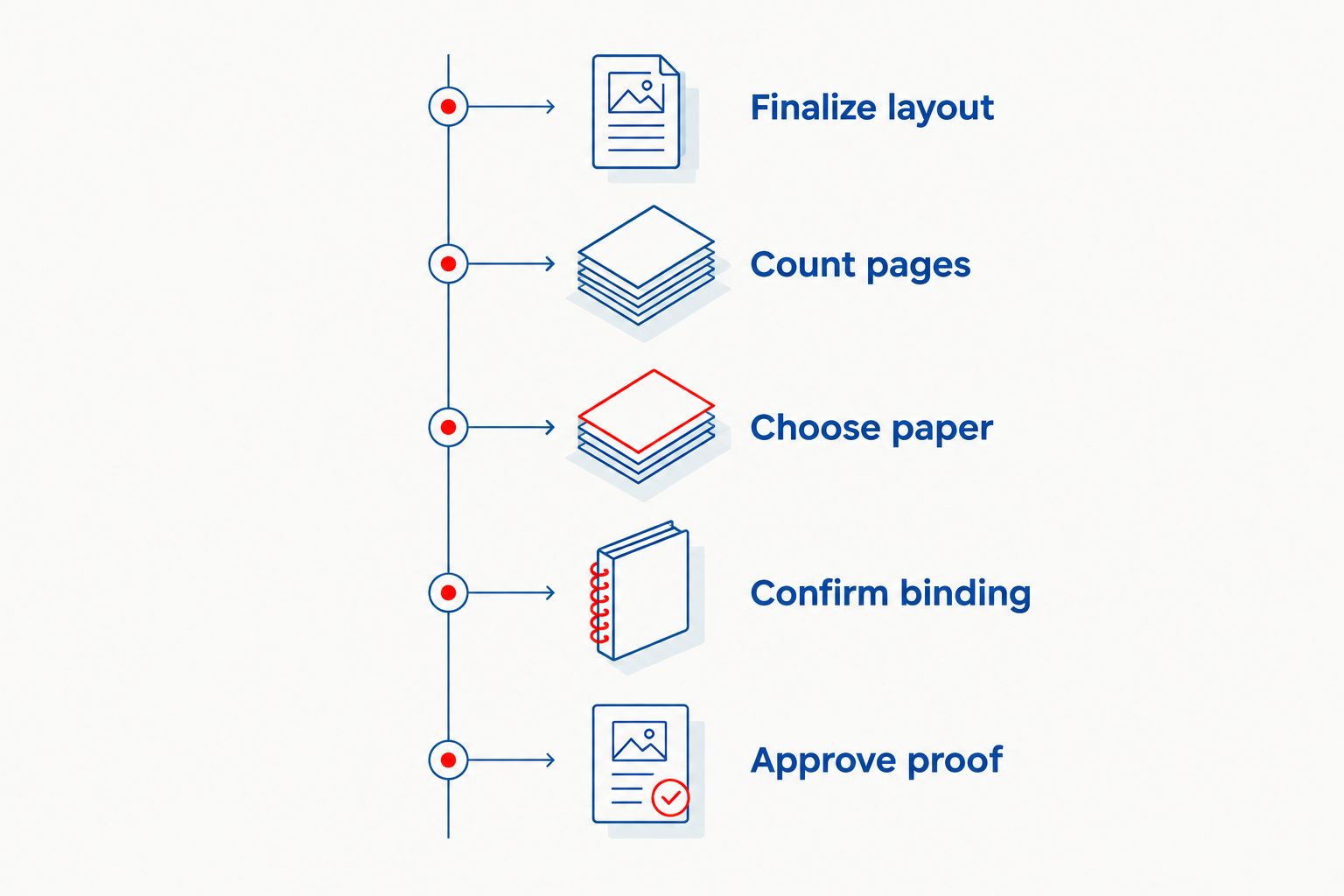
Send a project brief that includes the interior page total, finished size, paper choices, cover details, preferred binding, and copy quantity. State whether readers need the book to stay open for writing or reference.
Ask a specific question: does this complete specification fit the chosen binding? That gets you a construction decision, not a generic page-count answer that ignores the paper.
Publishing Xpress ships in 4 to 6 days after proof approval. That is the stated shipping schedule, not a promise that the books arrive within that same interval.
For a 2026 event or course deadline, leave room before approval for file preparation and corrections, then account separately for transit. Resolve page-capacity questions before approving the proof so your production decision matches the files being printed.
What are the book binding page limits for each type?
Book binding page limits depend on the printer, paper thickness, and construction. Publishing Xpress sets an 80-page maximum for saddle stitch; confirm perfect bound, plastic coil, and Wire-O capacity against the complete project specification.
Can every binding handle the same number of pages?
No, binding methods do not share a universal page capacity. Folded sheets, glued book blocks, and punched stacks each impose different construction requirements.
Does the 80-page saddle stitch maximum include the cover?
Confirm the cover-counting convention before submitting the booklet. Provide the interior page total and cover specification separately so the complete job can be checked against the maximum.
Do blank pages count toward a book’s page total?
Yes, blank pages count because they remain part of the physical book. Check the complete exported PDF, including unnumbered front matter and intentional blanks.
Why do saddle stitch booklets use multiples of four pages?
A sheet folded once creates 4 page positions. Conventional saddle stitch pagination follows that folded-sheet structure, while the printer’s maximum remains a separate requirement.
Is perfect binding better than spiral binding for a workbook?
Plastic coil or spiral binding is the better fit when the workbook needs to stay open for writing. Perfect binding suits paperback construction, but its glued spine does not behave like a punched lay-flat binding.
Does thicker paper reduce the page capacity of a binding?
Thicker paper increases the stack thickness at the same page count. The printer must check that thickness against the selected folding, gluing, coil, or wire construction.
What is the minimum book printing quantity?
Publishing Xpress has a minimum print quantity of 25 copies. Copy quantity is separate from the number of pages in each book and does not establish binding capacity.
Count the pages your reader never sees numbered. Copyright information, section dividers, and intentional blanks still become paper in the finished book.
Before sending your 2026 project for confirmation, compare the PDF's total page count with your production brief—not just the last chapter's page number. That simple check keeps the binding decision tied to the book you will actually print.
© 2026 Publishing Xpress. All Rights Reserved.