

October 16, 2026
Spiral binding is better than perfect binding for workbooks you write in regularly because it lies flat and folds back on itself. Perfect binding is the better choice for reading-heavy workbooks that need a printable spine, but a standard perfect-bound book does not offer the same hands-free writing surface.
Yes—choose spiral binding when completing exercises is the workbook's main job. Choose perfect binding when readers spend more time studying explanations than filling in answers. For a broader look at workbook formats, see the guide to binding options for workbooks and study guides.
In this comparison, spiral binding means plastic coil: a continuous coil threaded through holes along the binding edge. Perfect binding attaches the page block to a wraparound cover with adhesive.
| Decision point | Plastic coil binding | Perfect binding |
|---|---|---|
| Best for | Exercises, practice pages, and guided writing | Reading-heavy course books with occasional exercises |
| Open on a desk | Lies flat without holding the pages down | Standard construction does not reliably stay flat |
| Fold-back use | Pages turn around the coil for single-page use | Not designed to fold back on itself |
| Binding edge | Exposed coil and punched holes | Glued spine covered by the cover |
| Spine identification | No conventional printable spine | Spine text is possible when thickness allows |
| Layout requirement | Keep writing areas away from punched holes | Keep writing areas clear of the inner gutter |
| Main drawback | Coil occupies space beside the writing hand | Inner-page writing is less comfortable |
Neither format fixes a cramped page. Your 2026 workbook still needs generous answer space, readable instructions, and paper suited to the tools readers will use.
A workbook is a surface people work on, not just a book they read. If readers must hold it open while writing, the binding becomes part of every exercise.
Start with the task rather than the cover. For a 2026 course workbook, an attractive spine does not compensate for answer boxes that disappear into the gutter; equally, fold-back pages offer little benefit when almost every page is continuous reading.
Plastic coil wins when readers need both hands free to complete the work. Think of practice exercises, reflection prompts, calculations, diagrams to label, or progress logs. The pages lie flat, and readers can fold the book back to show only the page they need.
That fold-back position helps on a crowded desk. A reader can keep the workbook beside a keyboard, reference book, or training materials without keeping the full spread open.
The trade-off is the exposed binding. The coil occupies space along the page edge, and your layout must leave room for the punched holes as well as the reader's hand. A workbook with narrow inner margins remains awkward even when it lies flat.
Plastic coil also lacks the continuous spine of a perfect-bound paperback. If readers identify stored workbooks from their spines, make that limitation part of your decision rather than discovering it after printing.
Choose plastic coil for a write-in workbook; reconsider it when shelf identification is the main requirement.
Perfect binding wins when the workbook functions mainly as a course book with supporting exercises. It gives you a continuous cover and a conventional book shape, with spine lettering possible when the finished book is thick enough.
This format fits explanatory chapters followed by short review questions, reference sections, and reading assignments. Its advantage is book-style presentation—not easier handwriting.
The drawback appears near the gutter. Standard perfect-bound pages curve toward the glued spine, so readers need room between the binding and anything they must write, inspect, or annotate. Do not design an answer box across a spread and assume readers will comfortably write through the center.
For your 2026 edition, choose perfect binding only after checking the exercises in a bound sample with comparable construction. A flat PDF preview cannot show how much effort it takes to keep a page open.
Choose perfect binding for reading-led content; skip it when comfortable hands-free writing is essential.
The right choice depends on how the workbook gets used. These factors follow directly from the physical differences between coil and perfect binding:
Separate the requirements you need from the appearance you prefer. A visible spine is useful, but it should not outweigh the writing task if users complete exercises throughout the book.
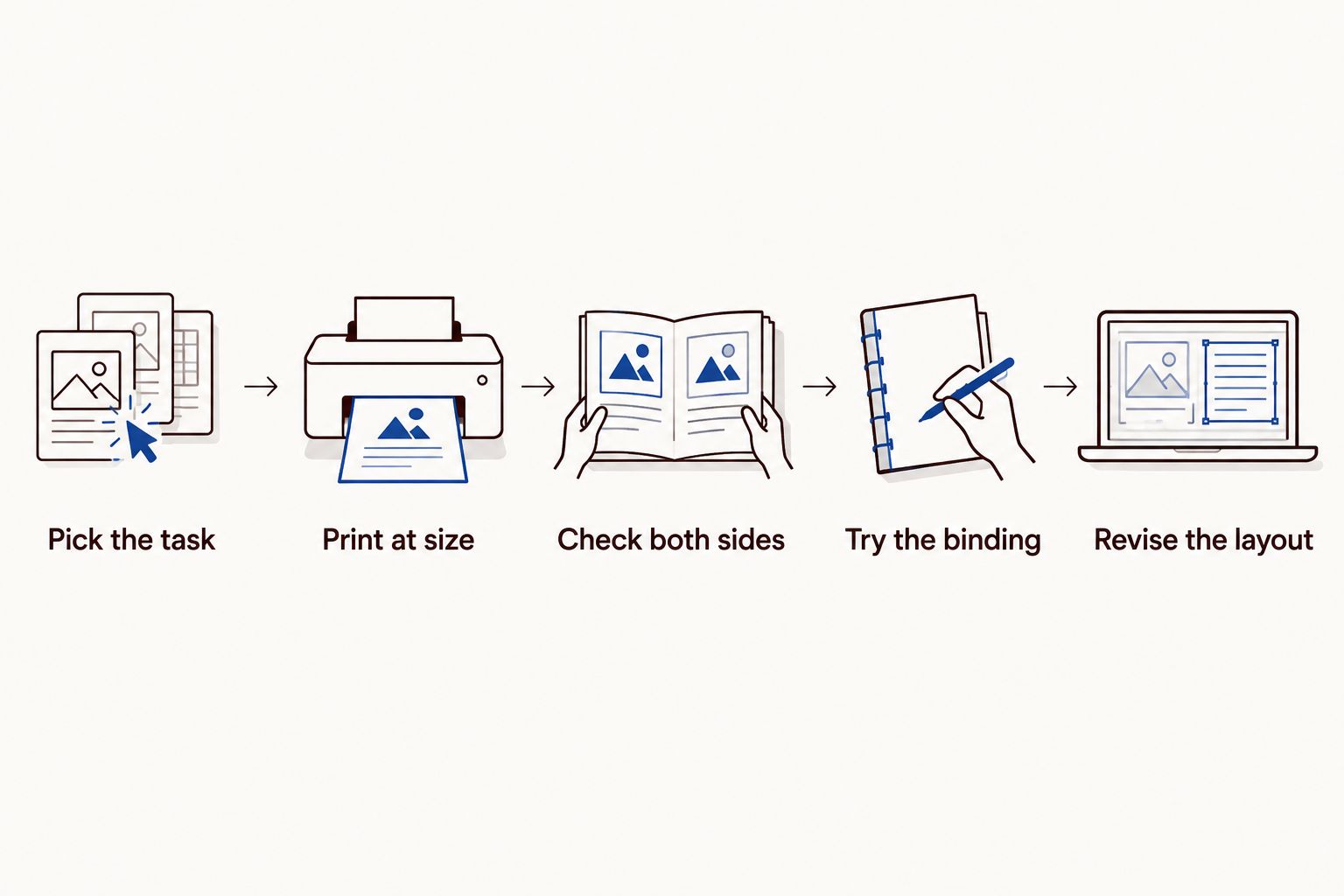
Test representative pages in the position readers will actually use. A printout reveals whether the exercise fits the page; a bound sample reveals whether the binding gets in the way. Both checks matter before you approve your 2026 files.
Choose a writing-heavy exercise, a reading-heavy section, and a page with a table or diagram. Use actual content rather than blank placeholder pages so you can judge instruction placement and answer space together.
Print the selected pages at 100% scale, not with a fit-to-page setting. Measure the result against your intended trim size before judging the layout; a reduced printout gives you the wrong impression of handwriting space.
Inspect a 2-page spread, including the left-hand and right-hand pages. The inner margin changes sides, so a layout that works on the right does not automatically work on the left.
Use a bound sample with a comparable format and thickness. Write near the inner edge, turn pages, and check whether the book stays open without your free hand holding it down.
Move answer areas, instructions, or labels away from the binding if the test exposes a problem. Then repeat the writing task; do not approve a revised page solely because it looks balanced on screen.
Binding is a layout decision, not just an ordering choice. Settle it before finalizing answer boxes, page numbers, and cover artwork. Switching the binding after layout can require changes throughout the document.
For plastic coil, keep essential text and writing areas outside the printer's punching clearance. Ask for the actual specification rather than applying a margin copied from an unrelated project.
For perfect binding, allow enough inner margin for the bound page's curve and comfortable access. A technically visible line is not necessarily a comfortable place to write.
Place a prompt and its answer area together where practical. Avoid forcing readers to turn away from instructions repeatedly while completing a single task.
A diagram that crosses the gutter introduces another problem: the center interrupts the image. Keep essential labels and details on an individual page whenever the exercise allows it.
A perfect-bound cover includes the back cover, spine, and front cover in a layout based on the finished spine width. Get that width from the printer after confirming the page count and paper.
Do not reuse that cover unchanged for a coil-bound edition. Follow the printer's cover-file instructions for the chosen binding, including clearance at the punched edge.
Binding controls how the workbook opens; paper controls the writing surface. Test the intended pen or pencil on a paper sample, and inspect both the written side and the reverse.
Do not assume that changing to coil solves show-through or an unsuitable paper finish. Those are separate choices that need their own check.
Publishing Xpress workbook printing suits self-publishers and organizations that need short runs with a choice of plastic coil or perfect binding. Its printing options also include black-and-white or color interiors, so you can choose the binding separately from how the content is printed.
The useful advantage is that you can match the physical format to the workbook's job. The limitation remains the format itself: plastic coil has no conventional printable spine, while standard perfect binding does not deliver coil-style fold-back use.
When discussing workbook printing with Publishing Xpress, describe the writing task along with your page count and intended paper. Ask for the binding-specific file requirements before finishing the layout.
A standard perfect-bound workbook does not reliably lie flat without support. Its glued spine and page construction differ from coil binding, so do not treat a paperback appearance as evidence of hands-free use.
If staying open is essential, specify that requirement before ordering. For a workbook used mainly for handwriting, plastic coil is the more direct fit.
Spiral binding helps a workbook stay open, but the coil can still obstruct a left-handed user's writing hand. Right-handed users encounter the same issue on the opposite side of a spread.
Leave usable space beside the binding and test both page sides. Flat opening and comfortable hand placement are related benefits, not the same requirement.
You can reuse the content, but check the layout separately for each binding. Coil needs punching clearance, while perfect binding needs a suitable inner gutter.
If you plan both formats in 2026, maintain separate final print files when their specifications differ. Check page numbers, exercise boxes, and cover files in each version before submission.
What’s better for a workbook, spiral binding or perfect binding?
Spiral binding is better for frequent handwriting because it lies flat and folds back on itself. Perfect binding fits reading-heavy workbooks where a conventional cover and possible spine lettering matter more.
Can I fold a spiral-bound workbook back on itself?
Yes, plastic coil binding allows pages to turn around the coil so you can use a single page at a time. Leave enough room beside the punched edge for comfortable writing.
Does perfect binding work for a course workbook?
Yes, perfect binding works for course workbooks built mainly around reading with occasional exercises. It is a less suitable choice when readers need every exercise page to stay open without support.
Can I print a title on the spine of a spiral workbook?
Plastic coil binding does not provide a conventional printable spine. Perfect binding supports spine lettering when the finished spine is wide enough for the printer’s requirements.
Do spiral-bound workbooks need an inner margin?
Yes, spiral-bound workbooks need clearance for punched holes and usable space beside the binding. Keep essential text, answer boxes, and page numbers outside the printer’s specified punching area.
How do I check whether my workbook is comfortable to write in?
Print representative pages at their intended size and try the writing tasks with a comparable bound sample. Check left-hand and right-hand pages, especially answer areas near the binding.
Does Publishing Xpress print both coil-bound and perfect-bound books?
Yes, Publishing Xpress offers plastic coil and perfect binding for short-run printing. Choose the format around how readers use the workbook, then confirm the file requirements for that binding.
Make the hardest exercise—not the cover—the deciding test. Choose the page with the tightest table, longest written response, or most detailed diagram, and complete it yourself with the intended writing tool.
If you keep moving your hand, holding down the page, or shortening your answer to fit the available space, revise the format or layout before printing. A workbook earns its place through use.
© 2026 Publishing Xpress. All Rights Reserved.

