

October 8, 2026
The minimum page count for perfect bound printing depends on the printer’s binding equipment and your interior paper; there is no universal minimum that applies to every book. The important limit is the thickness of the book block, not just the number of pages, and a bindable spine does not automatically have room for spine lettering. Before preparing a cover for your 2026 print order, confirm the accepted page count for your chosen paper.
There is no single industry-wide minimum page count for perfect binding. A printer must accept the thickness produced by your final interior page count and selected paper. A page-count rule from another printing service is not approval for your book.
Start with the interior PDF, then ask the printer to confirm the binding specification. If your book is thin, the perfect binding vs. saddle stitch guide explains the main format trade-offs.
These are the distinctions that matter when checking a minimum:
| Question | What determines the answer | What you should do |
|---|---|---|
| Can this book be perfect bound? | Book-block thickness and binding equipment | Confirm the page count with the exact interior stock |
| Can the spine carry lettering? | Usable spine width and the printer’s cover requirements | Get approval before adding a spine title |
| Does the cover count toward the minimum? | The printer’s counting convention | Give the interior count and identify the cover separately |
| Does the page total need adjustment? | Production requirements for the selected job | Ask about blank pages and required page increments |
For a 2026 printing project, treat the printer’s job-specific confirmation as the decision point. A generic threshold is not enough to size a cover or commit to a binding.
Choosing perfect binding too early creates avoidable layout work. If the finished interior is too thin for the selected production setup, you must change the paper, revise the interior, or use a different binding.
The cover is especially sensitive. Its spine panel must match the actual book block, so a cover prepared before the interior is final can need resizing. Finish the interior and confirm the paper before locking the cover dimensions.
Page count also tells you less about reading comfort than you might expect. A thin paperback intended for continuous reading has different needs from a workbook that readers must hold open while writing. Binding eligibility is only the first test; the reader’s task is the second.
A page is one side of a leaf. 1 leaf has 2 pages, whether both sides contain content or one side is blank. Counting leaves instead of pages gives the printer the wrong description of your interior.
Your printed page numbers are not a reliable total either. A title page, copyright page, contents page, or intentionally blank page still occupies a page in the PDF, even when no number appears on it. The last numbered page can therefore be lower than the complete interior count.
Use this counting checklist:
A blank leaf adds 2 interior pages, not one. If you want a chapter to begin on a particular side, check the resulting blanks in the exported PDF rather than assuming your layout software handled them as intended.
The same page total does not always produce the same spine thickness. These factors explain why a minimum for one specification does not automatically apply to another:
For your 2026 specification, send the printer the finished page total and the exact paper choice together. Asking only whether a manuscript is long enough leaves out the physical information needed to answer.
Do not substitute a paper weight for an approved spine measurement. Use the printer’s stock-specific calculation or supplied cover dimensions. That keeps the binding decision and cover file tied to the same production specification.
A page count that qualifies for perfect binding does not make perfect binding the right choice. Match the format to how someone will use the finished book.
| Binding | Best for | Main advantage | Main limitation |
|---|---|---|---|
| Perfect bound | Paperbacks intended for continuous reading | A glued spine gives the book a paperback form | Does not offer the same lay-flat behavior as coil or Wire-O |
| Saddle stitch | Thin programs, pamphlets, and booklets | Folded pages fasten through the fold | Has no broad, square spine for lettering |
| Plastic coil | Workbooks, planners, and hands-on reference books | Pages turn around the coil and stay open for use | Visible coil and punched holes change the presentation |
| Wire-O | Reports, portfolios, and reference materials used open | Pages open flat around the wire binding | Exposed wire loops need protection from crushing |
Choose perfect binding for the reading experience, not just to make a short document look longer. It suits a book you hold and read from beginning to end. For a write-in workbook or a manual used beside a task, plastic coil or Wire-O deserves consideration even when perfect binding is technically possible.
Saddle stitch has a different counting rule because a folded sheet contributes 4 pages. Conventional saddle-stitched booklets therefore use page totals divisible by four. Do not automatically apply that rule to perfect-bound books; ask the printer which increments the selected production method requires.
Use this sequence before completing your 2026 cover file. Each step resolves information the next step needs.
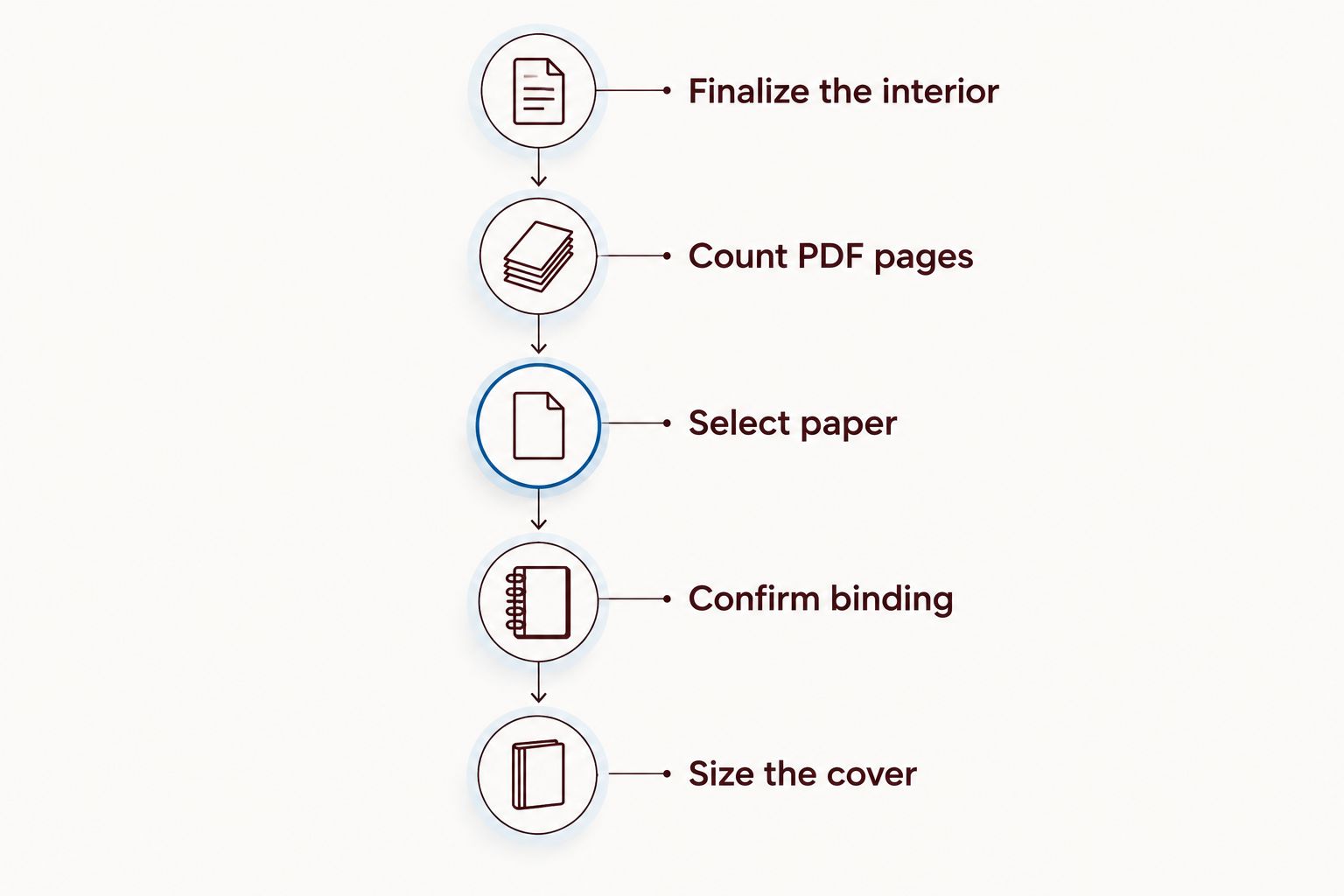
Send a clear request: give the trim size, interior page count, selected stock, and intended binding. Ask for confirmation of both binding eligibility and spine lettering. These are separate approvals.
If you revise the interior afterward, repeat the check. Adding pages, removing a section, or changing paper changes the book block; do not reuse an earlier spine measurement without confirming it still fits.
Change the specification deliberately rather than padding the book. Begin by asking whether another suitable stock makes perfect binding possible for the existing page count. Then assess whether that paper still serves your text, images, and intended use.
If the document is naturally short, saddle stitch can be a better format. An event program, brief guide, or concise booklet does not need a square spine to do its job. Preserve the useful content instead of stretching it to imitate a longer book.
Adding content is appropriate only when it helps the reader. A reference section, worksheet, glossary, or resource list belongs in the book when it supports the main material—not because the binding needs more pages.
Use these priorities:
A format change is often a cleaner editorial decision than unnecessary material. Your reader buys the content and its usefulness, not the thickness alone.
Binding eligibility does not guarantee enough space for a readable spine title. A printer can approve the book block while requiring a blank spine because the available width is unsuitable for lettering.
Ask for the usable lettering area after the spine width is confirmed. Keep lettering within the printer’s specified safe area, and do not squeeze a long title onto a narrow spine simply because the book can be bound.
Thicker paper increases book-block thickness at the same page count, but the printer must approve the resulting specification. Consider how the stock affects page turning, image reproduction, and the feel of the finished book before choosing it solely for binding eligibility.
Blank pages count when they are included in the finished interior PDF and printed book. They contribute physical leaves just as content pages do, but adding blanks solely to reach a threshold gives readers extra bulk without extra value.
Publishing Xpress is a fit for authors and organizations seeking short-run book printing. Its printing services include books, booklets, catalogs, and magazines, with perfect bound, saddle stitch, Wire-O, and plastic coil binding options.
That choice of formats lets you consider how the document will be used rather than committing to a paperback spine immediately. The decision still requires a confirmed specification: do not treat the availability of perfect-bound printing as approval for every page count or paper combination.
For Publishing Xpress book printing, prepare the interior total, trim size, paper choice, and intended use before asking about binding. Those details make the question specific enough to resolve before you invest more time in cover layout.
What’s the minimum page count for perfect bound printing in 2026?
There is no universal minimum page count for perfect bound printing. Confirm the accepted interior page total with the printer for your selected paper and binding setup.
Does my book cover count toward the minimum page total?
Give the printer your interior page count and identify the cover separately. Confirm the printer’s counting convention rather than adding cover panels to the interior total.
Do perfect-bound books need a page count divisible by four?
Perfect-bound books do not automatically follow the folded-sheet rule used for conventional saddle stitching. Confirm the required page increments for the printer’s production method.
Do title pages and blank pages count as book pages?
Title pages and blank pages count when they are included in the finished interior PDF. Count the entire file, not just pages carrying printed page numbers.
Can a thin perfect-bound book have text on its spine?
A thin perfect-bound book needs separate approval for spine lettering. Binding eligibility does not establish that the spine has enough usable width for a readable title.
Is saddle stitch better than perfect binding for a short booklet?
Saddle stitch is a suitable choice for thin booklets that do not need a square spine. Perfect binding suits paperback-style reading when the finished book block meets the printer’s requirements.
Does Publishing Xpress offer alternatives to perfect binding?
Publishing Xpress offers saddle stitch, Wire-O, and plastic coil binding alongside perfect binding. Match the format to the document’s purpose and confirm the requirements for the selected job.
Ask about spine lettering at the same time you ask about minimum page count. These questions sound interchangeable, but they solve different problems: one concerns whether the book can be bound, and the other concerns what fits on its cover.
For your final 2026 file check, make the approved interior PDF, paper selection, and cover dimensions a single matched set. If one changes, check the others before submitting the job.
© 2026 Publishing Xpress. All Rights Reserved.

