

September 30, 2026
Coworking space custom notebook printing is the production of branded writing books with the aim of supporting member onboarding, meetings, and shared-space events. This 2026 guide explains how to choose a useful interior, writing-friendly paper, and binding without turning your notebook into a membership brochure.
A coworking notebook serves different people: a new member learning the space, a freelancer taking client notes, and a guest attending a workshop. Give the notebook one main job before you design it. A general-purpose member notebook needs open writing space; a workshop notebook needs prompts that match the session.
Binding changes how those pages behave on a crowded desk. Start with the practical differences in choosing a book binding type, then match the format to the way members will write.
For your 2026 project, judge success by usefulness rather than logo visibility. A notebook does not establish that members will renew, refer friends, or attend events; measure those outcomes separately if they are part of your plan.
Coworking operators also need to separate lasting content from changing information. A notebook can outlive an event schedule, room-booking rule, or membership offer. Keep those details out of the permanent interior, and direct members to your current information instead.
Start manually: write a short project brief in a document you already use. Name the recipient, the handoff moment, and the activity the notebook supports. This prevents a welcome gift, workshop workbook, and sales brochure from competing inside the same cover.
Best for member onboarding: a mostly open notebook with a brief welcome page. Best for facilitated sessions: a structured interior built around the actual exercises. Neither format needs lengthy promotional copy between writing pages.
For a 2026 welcome notebook, keep the date in your production records unless the notebook genuinely belongs to that year. An undated design remains usable when the calendar changes.
Create sample pages in your existing document or layout software before commissioning artwork. Print them at their intended size, write on them, and check whether the layout leaves enough room for real notes. Screen previews do not show how comfortable a writing area feels under your hand.
Best for mixed member needs: a restrained, general-purpose interior. Lined pages support prose notes; blank pages support sketching; dot grids provide alignment without prescribing every line. Each has a limitation, so choose based on member feedback rather than assuming everyone wants a planner.
Avoid combining every layout in equal amounts just to make the notebook look versatile. A recurring page pattern is easier to understand than a sequence of unrelated templates.
Fold and staple a paper mockup first, then handle examples of the binding styles you are considering. Try writing beside a laptop, carrying the notebook in a bag, and opening it near the beginning and end. The right choice depends on use, not just appearance.
Publishing Xpress offers short-run digital printing with perfect bound, saddle stitch, Wire-O, and plastic coil binding, without large minimum order requirements. Professional production replaces in-house printing and assembly; it does not replace your layout decisions or proof review.
Publishing Xpress is best for coworking operators seeking short-run digital printing with multiple binding choices. Discuss your intended notebook with Publishing Xpress before finalizing the cover or binding margin. Confirm that the chosen configuration fits the current production requirements.
Start with samples, not a paper-weight guess. Test the available interior stocks using the pens your members bring, and inspect both sides after writing. A paper description alone does not establish ink behavior, show-through, or how the surface feels.
Best for everyday note-taking: a writing-friendly, uncoated interior selected through testing. A glossy interior is better suited to image presentation than to a notebook whose main job is handwriting. Even an uncoated stock still needs a pen test.
Publishing Xpress digital printing includes black-and-white and color options. Choose color where it helps people use the notebook, rather than carrying decorative color onto every writing page. Confirm the current stock choices for your intended binding before approving the specification.
Build the cover and interior using the printer’s current instructions. You can prepare the layout yourself, but do not guess the bleed, trim, binding clearance, or cover dimensions. Those requirements must match the production method and final specification.
Keep the coworking identity clear without making the cover an advertisement. A recognizable name or mark is enough to connect the notebook to the space. Put any longer welcome message inside, where it does not crowd the cover or interrupt writing.
Best for a reusable member notebook: an undated cover with stable information. Put temporary workshop details on a separate insert when possible. For saddle stitch, folded sheets create 4-page increments; confirm how the printer counts covers and blank pages before exporting.
Start with a full-size office printout to catch wording, page order, and layout problems. That is a useful first check, not a substitute for testing the actual paper and binding. Confirm what physical proof or sample options the printer provides before approving production.
Ask someone unfamiliar with the design to use the notebook without explanation. If that person cannot tell where to write, the layout needs work. Test the front, middle, and back rather than approving the notebook from its cover alone.
Best for avoiding repeat errors: one designated approval owner with a written change list. Resolve corrections in the source files, export again, and review the replacement PDF rather than assuming the edits survived export.
Use a spreadsheet before adding inventory software. Record where notebooks go, which version staff distribute, and how much remains. Separate member onboarding from public events so an unexpected workshop does not consume the welcome supply.
For your 2026 distribution plan, base the order on named uses: planned welcome kits, confirmed events, and a deliberate reserve. Do not treat the total number of members as proof that everyone needs another notebook. Ask staff about existing stock before placing the order.
Best for improving the next run: brief, specific feedback about paper, binding, and page layout. Pickup counts show distribution, not daily use. Ask whether members kept using the notebook and which parts they ignored.
Choose the binding around the writing task. Plastic coil and Wire-O support flat opening and fold-back use; saddle stitch suits thin notebooks; perfect binding provides a book-style spine but is less suited to writing close to the inner edge.
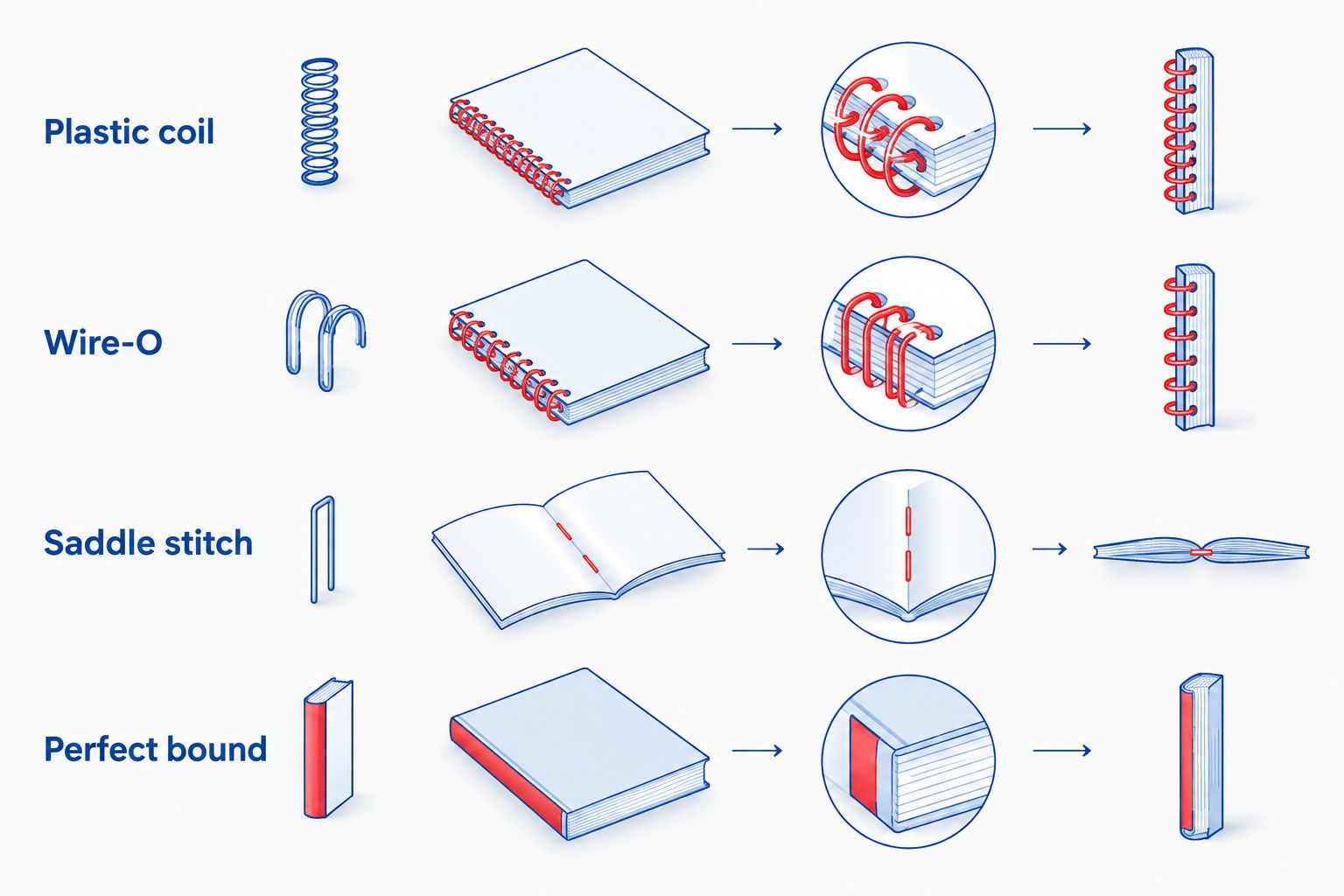
| Option | Best for | Practical advantage | Key limitation |
|---|---|---|---|
| Plastic coil | Member notebooks used beside laptops | Pages open flat and fold back | The coil adds bulk along the binding edge |
| Wire-O | Meeting notebooks and guided workshop journals | Pages open flat with paired wire loops | Wire loops can bend if crushed |
| Saddle stitch | Thin event notebooks | A simple folded format without an external coil | Page count follows folded-sheet increments and thickness limits |
| Perfect bound | Book-style notebooks with substantial interiors | A glued spine gives a conventional book format | Pages do not fold back like coil-bound pages |
| In-house folded prototype | Testing a layout before ordering | Staff can revise and print drafts themselves | It does not reproduce the final paper or binding |
Publishing Xpress provides the four commercial binding styles in this table. Your final choice still needs confirmation against the notebook’s paper, dimensions, and page count. A binding option is not an approved production specification.
Repeated offers and large footers take room away from member notes. Put essential coworking information on a short introductory page, then let the notebook do its job. A cover carrying the space’s identity does not require a promotional message on every spread.
Room prices, event dates, access instructions, and member lists become outdated independently of the notebook. Keep changeable information in a maintained channel or separate insert. Do not print security credentials in a notebook that people can leave in a meeting room.
An attractive screen preview cannot demonstrate pen performance or comfortable binding clearance. Write on the intended stock and check the reverse side. Test the actual use case, including taking notes while the notebook sits beside other desk items.
Membership totals do not tell you how many notebooks staff will distribute. Count planned handoffs and check existing inventory. Keep event allocations separate so reception staff can see what is available for new-member kits.
A dated planner needs calendar-specific content and timely distribution. An undated notebook avoids that constraint. Use a 2026 planner only when dated planning is the main purpose, not because the order happens to be placed this year.
What’s the best binding for a coworking space notebook?
Plastic coil is a strong choice when members need pages to open flat and fold back beside a laptop. Wire-O also supports flat opening; test both formats before choosing for your workspace.
Can Publishing Xpress print a small batch for our coworking space?
Publishing Xpress offers short-run digital printing without large minimum order requirements. Confirm the quantity and configuration for your notebook before finalizing the files.
Should coworking notebooks have lined, dotted, or blank pages?
Choose lined pages for prose notes, dotted pages for flexible alignment, or blank pages for sketching. Ask members to try sample layouts rather than combining formats without a clear reason.
Is Wire-O better than perfect binding for meeting notes?
Wire-O is better suited to meeting notes when flat opening is the priority. Perfect binding provides a book-style spine but does not fold back like a loop-bound notebook.
What paper should we choose for custom notebooks?
Start with writing-friendly uncoated paper and test the actual stock with members’ pens. Check smearing and reverse-side show-through before approving the interior.
Do we need a physical proof before printing notebooks?
A physical proof or representative sample is the best way to check handwriting comfort, paper, and binding. Confirm the printer’s proof options; an office printout checks layout but does not reproduce the finished notebook.
Should our notebook cover include 2026?
Include 2026 only when the notebook is tied to that year, such as a dated planner or annual event edition. Use an undated cover for general member notebooks you intend to distribute across calendar years.
Design the notebook to remain useful after someone leaves your coworking space. Keep most pages open for writing, avoid expiring information, and make identification optional. That is a practical test of the design: if removing the welcome page makes the notebook better, shorten the welcome page before printing.
© 2026 Publishing Xpress. All Rights Reserved.

