October 9, 2026
Wire-o binding has no single maximum page count: capacity depends on the thickness of the complete book and the wire size your printer uses. Covers and dividers take up space too, so an interior page count alone does not establish whether a book will fit. For your 2026 project, confirm the finished thickness and binding specifications before you finalize the layout.
Wire-o capacity is a thickness limit, not a universal page limit. A thin-paper book and a thick-paper book with identical page counts need different amounts of binding space. The wire must accommodate the complete stack while leaving room for pages to turn.
Start by separating the interior page count from the physical sheet count. Each leaf has 2 page surfaces, front and back; printing on only one side does not remove the blank reverse from the book.
| Interior arrangement | Physical sheets | Page surfaces | What it tells you |
|---|---|---|---|
| One leaf, front and back | 1 sheet | 2 pages | Pages and sheets are different units |
| Two leaves, front and back | 2 sheets | 4 pages | Double-sided printing uses both surfaces |
| Three leaves, front and back | 3 sheets | 6 pages | Sheet count still does not establish thickness |
These are counting examples, not binding-capacity ratings. To establish capacity, your printer needs the actual paper, covers, and any additional bound materials.
Before you export the interior, review how to prepare files for wire-o binding. A correct page count is useful only when the file also matches the intended printed book.
Choosing wire-o by page count alone creates a preventable problem: your finished book can be thicker than the binding specification allows. Discovering that after layout approval means revisiting the paper, content, or binding choice.
The opposite mistake is treating the largest possible wire as the safest choice. Binding fit matters. You want pages to move freely without an unnecessarily loose assembly, not simply a wire large enough to surround the stack.
For a 2026 workbook, cookbook, or training manual, start with how the reader will use it. A book that stays open on a desk has different practical requirements from one designed mainly for shelf storage. Capacity is one decision; usability is another.
The physical materials explain why a page-count limit cannot apply to every wire-o book. Keep these factors together when you describe your project:
Keep the paper and cover specifications attached to every capacity question. Asking whether a page count fits without naming the materials leaves out the information that determines the answer.
Changing a stock after approval also changes the question. If you replace a paper with a thicker one, ask the printer to check the binding fit again rather than assuming the earlier answer still applies.
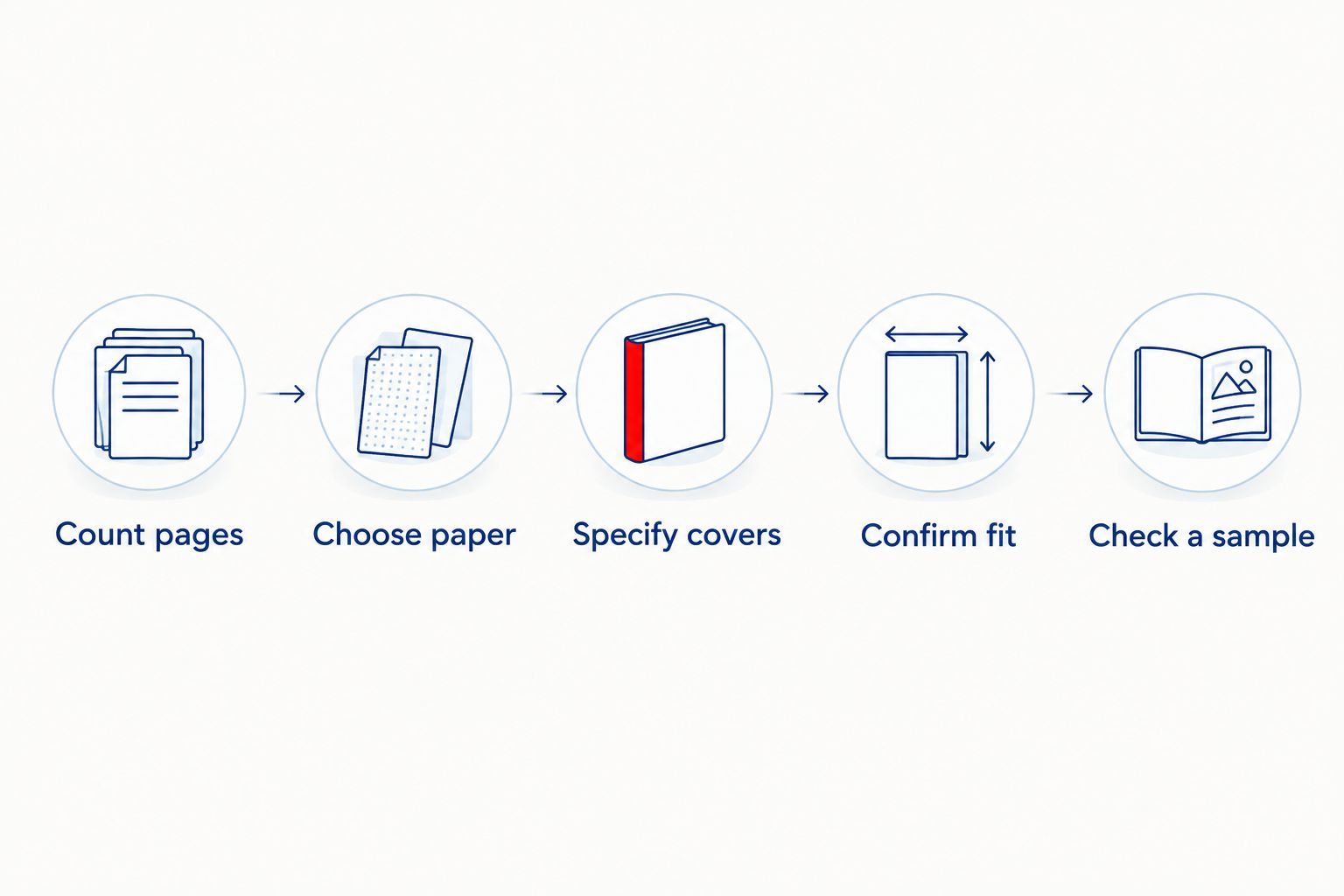
Use this sequence before approving a wire-o book. It turns a vague question about maximum pages into a project the printer can evaluate.
A digital proof helps you review layout, but it does not show how a physical stack moves inside the wire. Keep those approval tasks separate. For a 2026 print project, confirm the file and the binding fit before treating the book as production-ready.
Double-sided printing puts content on 2 page surfaces per sheet. Compared with printing the same content on separate single-sided leaves, it uses fewer physical sheets. That reduces the interior stack, provided the paper remains the same.
Be precise when describing a single-sided book. A printed front still has a blank reverse, and that reverse remains part of the physical leaf. Tell the printer which sides should stay blank rather than relying on the phrase single-sided to explain the file arrangement.
For worksheets, the blank reverse can be intentional. Readers might need space for notes, or you might want to separate activities. Keep those choices when they serve the reader; do not remove them solely to chase a higher content count.
Covers count toward binding thickness, even when the printer counts interior pages separately. The wire passes through the bound materials, so the complete assembly determines the fit.
That distinction matters when you receive a page-count instruction. Ask whether it refers to interior PDF pages, physical leaves, or the entire assembled book. Those terms describe different things and should not be used interchangeably.
For your 2026 order, keep the cover description beside the interior specification. If you later add dividers or change cover materials, request a fresh fit check before approving production.
Change the specification before forcing the binding. Your choices are to reduce unnecessary material, use a suitable thinner stock, divide the content, or choose another binding that meets the book's requirements.
Start with material that does not help the reader. Remove duplicate instructions, obsolete sections, and accidental blank pages. Keep useful notes pages and essential front matter; a smaller book is not automatically a better book.
Next, discuss paper options with the printer. A thinner stock changes more than the stack: opacity, feel, and suitability for writing or illustrations also matter. Do not solve a thickness problem by creating a readability problem.
Splitting a large manual into separate volumes is another practical route. Divide it at meaningful sections so readers can find what they need without repeatedly switching books. Recheck each volume's contents page, section references, and cover identification.
If the complete text must remain together, revisit binding. Choose the alternative for its confirmed fit and reading behavior, not an assumed higher page limit.
Wire-o suits books that readers need to keep open while working. Its exposed metal loops also need protection from crushing, so the way readers carry and store the book matters.
Publishing Xpress offers wire-o, plastic coil, perfect binding, and saddle stitch. The table compares their general construction and use, not printer-specific page limits.
| Binding | Best for | Main advantage | Main limitation |
|---|---|---|---|
| Wire-o | Desk-based workbooks and reference books | Opens flat and allows pages to fold back | Exposed metal loops can deform under pressure |
| Plastic coil | Planners and frequently handled workbooks | Flexible coil allows flat opening and fold-back use | Exposed coil does not provide a conventional printable spine |
| Perfect binding | Books needing a conventional spine | Glued spine provides space for spine printing when wide enough | Does not offer wire-o's fold-back opening |
| Saddle stitch | Thin booklets and event programs | Folded sheets create a simple stapled booklet | Folded construction limits the practical thickness |
Publishing Xpress is a short-run printing option for self-publishers who need wire-o binding. The service fit is clear; the finished capacity still needs confirmation for your particular materials.
You can discuss the project through Publishing Xpress. Bring the final interior count, paper choice, cover specification, and intended use so the binding discussion starts with the complete book.
Confirm your book’s binding fit
Discuss your interior pages, paper, covers, and intended use before finalizing wire-o binding.
A book can fit the wire and still have a poor layout. Wire-o needs a clear area along the binding edge because punching removes material from each leaf.
Keep text, page numbers, answer boxes, and essential artwork outside that area. Ask the printer for its required clearance rather than importing a margin from a different binding method. Check both left-hand and right-hand pages when the book is printed double-sided.
For a 2026 workbook, test the writing area as well as the text. A question can remain readable while the nearby answer space becomes awkward to use beside the wire. Move the working area far enough from the binding to keep it practical.
Images that cross a spread need special attention. Wire-o leaves a visible separation between facing pages; it does not create an uninterrupted image surface. Avoid placing a face, diagram label, or other essential detail across the bound edges.
Send one complete specification instead of several disconnected questions. Include these points in your production discussion:
For Publishing Xpress wire-o printing, use that specification as the basis for confirming fit. Keep the approved details with the final files so a later paper or cover change does not pass unnoticed.
What’s the maximum number of pages for wire-o binding?
Wire-o binding has no universal maximum page count. The complete stack thickness, selected wire, and printer’s equipment determine the limit for a particular book.
Does one sheet count as one page or two pages?
One sheet has 2 page surfaces, one on each side. A blank reverse still exists physically, so distinguish PDF pages from sheets when describing your book.
Can wire-o binding handle thick covers?
Thick covers must be included in the binding-fit check. Whether they work depends on the complete assembly and the printer’s binding specifications.
Is wire-o better than plastic coil for a workbook?
Wire-o and plastic coil both suit workbooks that need flat opening and fold-back use. Wire-o uses metal loops that can deform under pressure; plastic coil provides a flexible binding element.
Can I add pages to a finished wire-o book?
Wire-o is not designed for routine page additions like a ring binder. Adding leaves requires opening or replacing the binding and checking the new stack’s fit.
Does wire-o binding need a page count divisible by four?
Wire-o does not inherently require a page count divisible by four because it binds individual punched leaves rather than folded booklet sheets. Follow your printer’s instructions for blank pages and double-sided file setup.
Can Publishing Xpress print a wire-o book?
Publishing Xpress offers wire-o binding as part of its short-run printing services. Confirm the capacity for your selected interior paper, covers, and final page count before approving the project.
The useful limit is not just whether the book closes; it is whether the pages turn comfortably. A stack squeezed into a wire is not a successful finished book if readers have to fight the binding.
Before approving your 2026 project, check pages near the front, middle, and back of a physical sample when one is part of your approval process. Confirm both fit and usability, then keep the approved paper and cover choices unchanged.
© 2026 Publishing Xpress. All Rights Reserved.