November 3, 2026
Best overall for short-run wholesale catalog printing: Publishing Xpress. Best for a full-line catalog: perfect bound printing; best for a compact seasonal edition: saddle stitch; best for a working reference: plastic coil; best for a tabletop presentation: Wire-O. This 2026 guide compares those printing services by how your distributors, sales representatives, and buyers will use the finished catalog.
A wholesale catalog has to do more than display attractive product photographs. Your buyer needs to identify the right item, distinguish similar variants, and understand how to place an order without hunting through disconnected information.
The binding affects that work. A catalog handed out at a buying event serves a different purpose from a reference book that stays open beside a sales representative all day. Choose the reader's task before choosing the binding.
This guide ranks catalog printing formats rather than presenting an unsupported league table of competing printers. Each option has a distinct job, and the right choice depends on your page count, distribution plan, and reading position.
Use these criteria to judge a printer and the format you request. Keep the specifications consistent when comparing quotes so you are evaluating the same finished catalog.
For your 2026 catalog, put those requirements into a written brief before requesting production. A clear brief prevents a format decision from becoming a late layout revision.
The order below matches the detailed recommendations. These are use-case rankings, not claims that one binding outperforms every other binding.
| Printing service | Best for | Standout feature | Key limitation |
|---|---|---|---|
| Perfect bound printing | Full-line buyer catalogs | Glued spine and book-style format | Does not naturally stay flat when open |
| Saddle stitch printing | Compact seasonal editions | Folded pages secured through the fold | Maximum of 80 pages at Publishing Xpress |
| Plastic coil printing | Working reference catalogs | Flexible coil allows pages to turn back | No conventional printable spine |
| Wire-O printing | Tabletop buyer presentations | Twin-loop wire supports flat opening | Wire can deform if crushed |
Perfect bound printing joins the interior pages at a glued spine and wraps them in a cover. It suits a full-line catalog organized into product families, especially when buyers browse several categories before returning to specific entries.
Best for: Distributors producing a book-style catalog of their wider product range.
A perfect bound catalog gives you a familiar structure: contents, category sections, product listings, and an index. Where the spine is wide enough, spine text also helps readers identify the catalog when it is shelved; confirm that detail after the paper and page count are final.
Perfect bound printing pros:
Perfect bound printing cons:
Keep item codes and comparison tables away from the inner edge. Do not place a critical product detail across a spread where the binding interrupts it.
Publishing Xpress offers perfect bound catalog printing for distributors choosing a book-style format. Confirm that your proposed page count and paper combination suit the binding before completing the cover.
Verdict: Buy perfect bound printing for a full-line catalog; skip it when hands-free reference is the main requirement.
Saddle stitch printing secures folded sheets through the center fold with staples. It works well for a focused seasonal range or category edition that does not need the structure of a thicker book.
Best for: Distributors presenting a compact selection for a specific selling period.
In 2026, keep the seasonal edition focused on what the buyer needs for that campaign. A tightly edited catalog is easier to structure than a shortened master catalog that retains incomplete sections.
Saddle stitch printing pros:
Saddle stitch printing cons:
Confirm how the printer counts the cover and interior before finalizing pagination. As folded sheets nest together, inner pages shift outward; keep important text clear of the trim and follow the printer's layout instructions.
Verdict: Buy saddle stitch printing for a compact seasonal catalog; skip it if your planned catalog exceeds 80 pages.
Plastic coil printing threads a continuous plastic coil through punched holes along the binding edge. Pages can lie flat or turn back, making the format useful beside an ordering workstation or during product selection.
Best for: Sales representatives and counter teams who repeatedly consult product specifications.
Design the catalog around quick lookup rather than uninterrupted reading. Use repeated category labels, a consistent specification order, and an index that points readers to the correct product family.
Plastic coil printing pros:
Plastic coil printing cons:
Do not confuse coil binding with a loose-leaf system. If your catalog changes frequently, plan revised editions rather than assuming the bound pages can be swapped during normal use.
Verdict: Buy plastic coil printing for a frequently consulted working catalog; skip it when a shelf-readable spine is essential.
Wire-O printing uses twin-loop wire through holes along the binding edge. The catalog opens flat and can fold back, allowing a representative to keep a product spread visible during a buyer conversation.
Best for: Distributors presenting selected product ranges across a table.
Wire-O and plastic coil share several reading benefits. The decision here is about the presentation format and handling conditions, not a claim that wire binding makes the printed pages better.
Wire-O printing pros:
Wire-O printing cons:
Keep photographs and specification grids outside the punched area. Store presentation copies so pressure does not bear directly on the wire, especially when representatives transport them with other materials.
Verdict: Buy Wire-O printing for tabletop presentations; skip it when flexible binding is the priority.
Perfect binding favors a book-style catalog, saddle stitch favors a compact edition, and coil or Wire-O favors an open working spread. Compare how readers hold and turn the pages, not just how a closed cover looks.

The ranking follows the criteria above: quantity, page-count fit, reading position, product clarity, proof control, and schedule. Full-line browsing gets the default slot; seasonal distribution, working reference, and tabletop presentation each receive a separate recommendation.
This is a format comparison for 2026, not a print-quality test or a claim about competing suppliers. Request a project-specific quote using the same page count, paper, color requirements, quantity, and destination for every printer you consider.
A usable brief connects the printed object to your sales process. Complete these steps before you finalize the file, because binding and distribution decisions affect the layout.
Keep a single approved content source. A designer should not have to decide whether a spreadsheet, an email attachment, or an older catalog contains the correct specification.
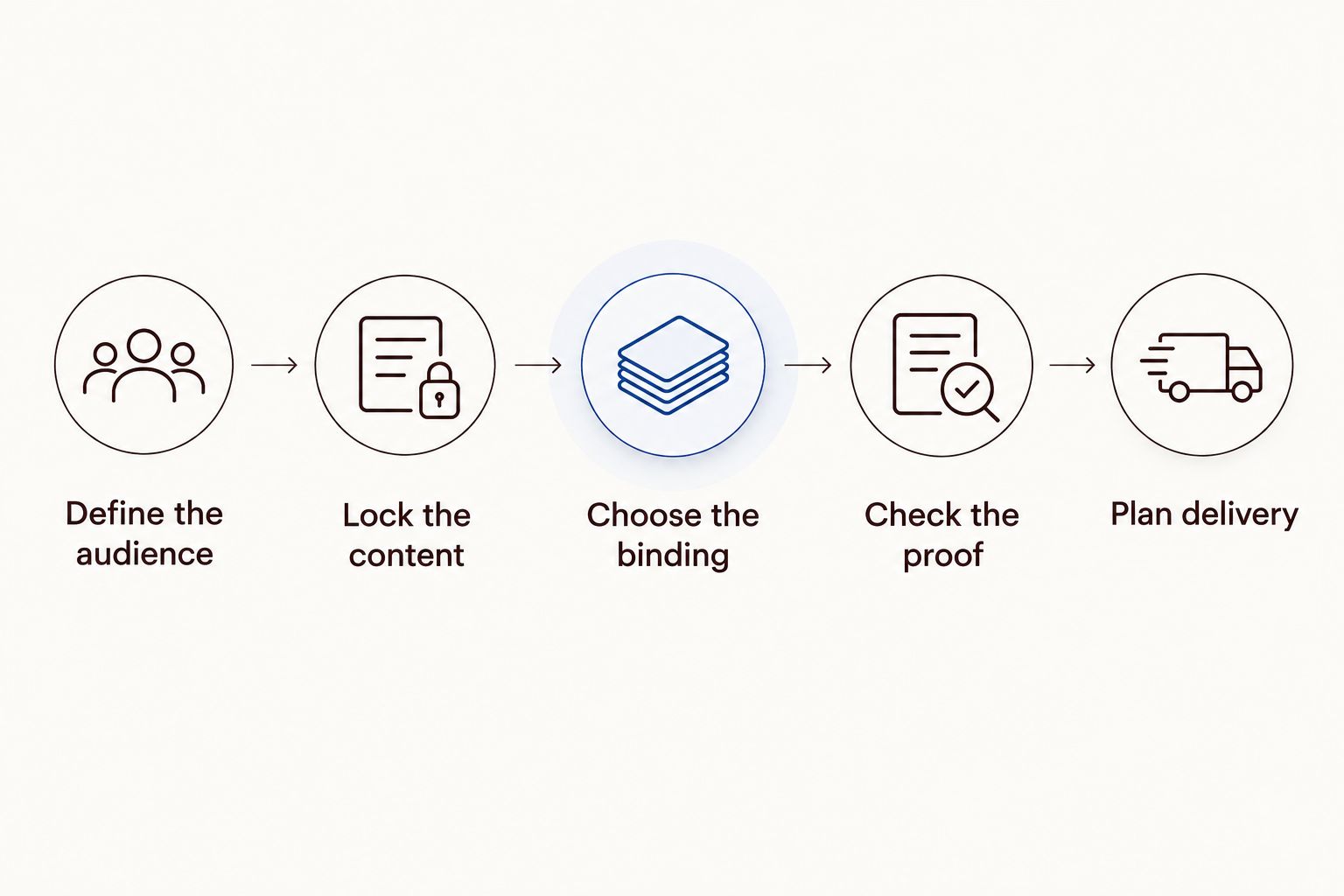
The minimum print quantity is 25 copies. Build your order from known recipients and planned uses, then decide separately whether you need additional copies for later requests.
Do not assume every account needs every edition. A focused category catalog can serve a different audience from the full-line book, provided each version has clear ordering instructions and an identifiable edition.
Publishing Xpress ships in 4 to 6 days after proof approval. That shipping window is not an arrival promise, and proof preparation happens before it begins.
For a 2026 buying event, confirm the destination and required arrival date before approving production. Use the contact page to discuss the schedule for your specific catalog rather than treating dispatch and delivery as interchangeable.
Read the file in the order a buyer will use it: category, product, variant, specification, and ordering instruction. A catalog can look polished while still making an item difficult to identify.
Check these details separately:
Inspect the final exported PDF rather than relying on the editable source file. Exporting is a production step, not proof that every page is ready.
Publishing Xpress is best for wholesale distributors needing short-run catalog printing with a minimum order of 25 copies. Choose perfect binding as the default for a full-line buyer catalog, then change that choice only when the reading task calls for it.
Choose saddle stitch for a compact seasonal edition within the 80-page limit. Choose plastic coil for a working reference, or Wire-O for a tabletop presentation. For your 2026 edition, make the binding decision before the final cover and inside margins are approved.
What’s the best wholesale catalog printing option for a distributor?
Perfect bound printing is the default choice for a full-line buyer catalog. Choose saddle stitch for a compact seasonal edition, plastic coil for working reference, or Wire-O for tabletop presentations.
Can I print a small batch of wholesale catalogs?
Publishing Xpress accepts catalog printing orders starting at 25 copies. Set the quantity from your buyer list, representative needs, and planned distribution rather than an assumed audience.
Is saddle stitch suitable for a long product catalog?
Saddle stitch is limited to 80 pages at this printer. If your catalog exceeds that limit, discuss perfect binding, plastic coil, or Wire-O instead of forcing the content into a smaller layout.
Which catalog binding stays flat during a sales meeting?
Plastic coil and Wire-O allow a catalog to lie flat. Plastic coil suits a working reference, while Wire-O is a useful choice for tabletop buyer presentations.
How long does wholesale catalog printing take?
Publishing Xpress ships in 4 to 6 days after proof approval. Allow separately for preparing files, reviewing the proof, and transit to your destination.
Can I replace pages in a plastic coil catalog?
Plastic coil binding is not designed for routine page replacement. Plan a revised edition when content changes rather than treating the catalog as a loose-leaf system.
What should I check before approving a catalog proof?
Check product codes, specifications, image placement, page references, and ordering instructions in the final exported PDF. Also inspect the binding margin so important information stays clear of the gutter or punched edge.
Put an edition identifier somewhere readers can find it without opening the catalog. A clear issue date or edition label helps your sales team distinguish current copies from superseded ones before discussing a product.
Carry that identifier into the file name and internal approval record. When someone reports a catalog error, you need to know which printed edition they are holding—not just which cover they recognize.
© 2026 Publishing Xpress. All Rights Reserved.